
🔄 Last updated: May 29, 2026
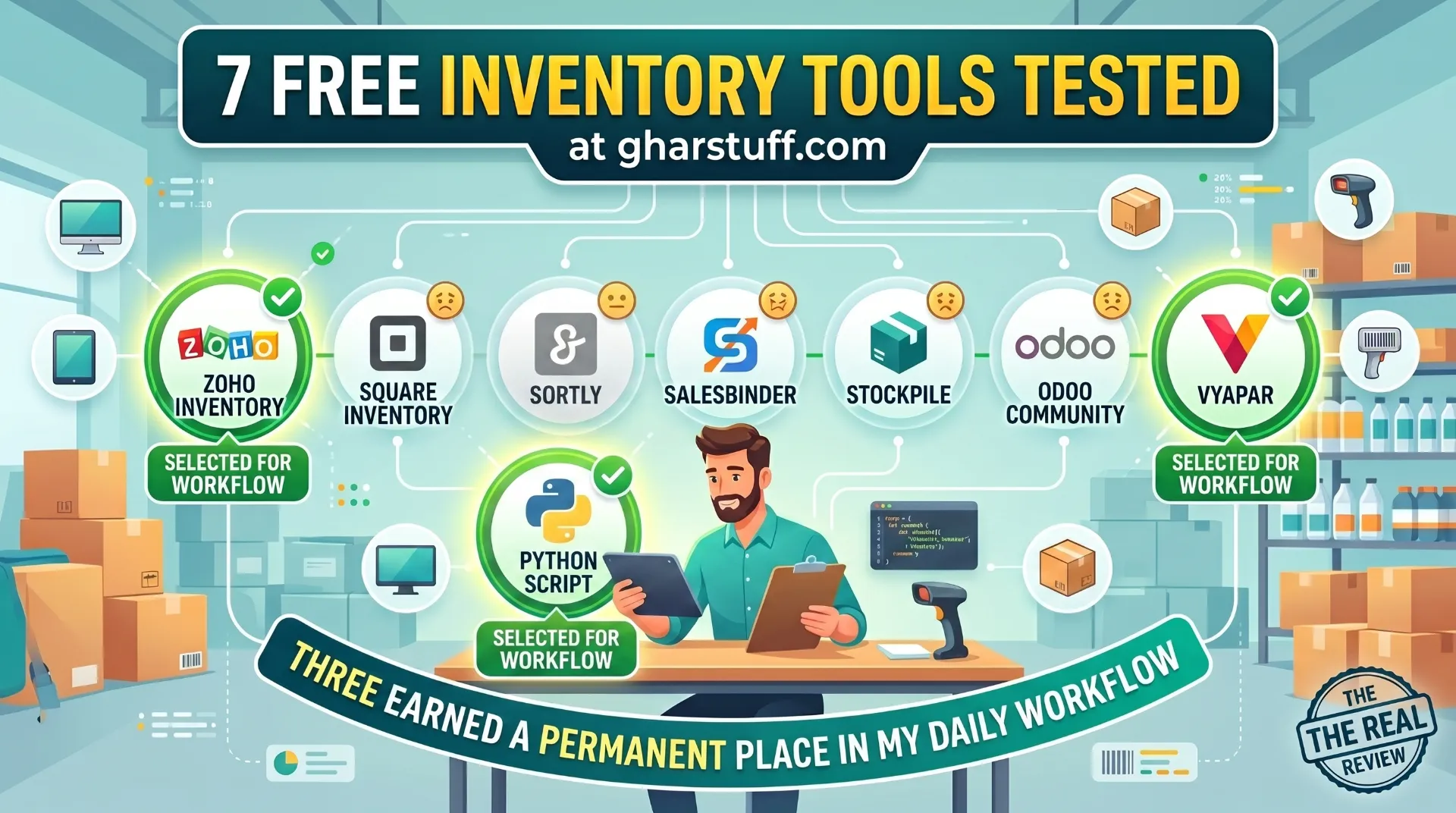
This review of free inventory management software for small business is based on testing 7 tools in my real grocery store with 800–1,200 SKUs. I didn’t install them for 20 minutes and write a feature comparison — I ran actual stock through them, had Vishal try the interfaces, and tracked which ones prevented waste and which ones created more work. Three of these I still use daily. Four I deleted.
What is the best free inventory management software for small business?
Zoho Inventory is the best free inventory management software for small businesses — 50 orders/month, 1,000 SKUs, batch-level expiry tracking, reorder points, and API access at $0 forever. For India-specific GST billing alongside it: Vyapar (free Android). For Square POS users: Square’s built-in inventory. For open-source unlimited power: Odoo Community (requires technical setup). Google Sheets works for stores under 200 SKUs starting out.
I tested 7 free inventory tools at gharstuff.com over the last 18 months. Some I used for a week. Some I used for a day before Vishal said “bhaiya, yeh toh aur mushkil hai” — this is even harder. Three of them I still use daily. Four of them I deleted and never looked back.
In a small grocery store, inventory software has to answer three questions: What stock do I have right now? What will run out tomorrow? What is going to expire? If it can’t answer those three things quickly, it fails — no matter how many features it has on a sales page.
The honest truth about “free” inventory software: most free plans are either severely limited trials or genuinely free but too basic for a real store. The sweet spot — usable free plans with real inventory depth — is smaller than most comparison lists suggest.
One quick note before the list: inFlow On-Premise had a popular free edition but sunset it in July 2024. inFlow Cloud now starts at $129/month. It’s off this list entirely. Any article still recommending “inFlow free” is out of date.
💡 How to read this list: “Free” means genuinely $0 to operate for a small store on an ongoing basis. I exclude 14–30 day trials unless the core product is also free. I exclude freemium tools where the free tier is deliberately designed to frustrate you into upgrading within a week.
Quick Comparison: Free Inventory Management Software for Small Business (2026)
| Tool | Free Plan Limits | Best For | Biggest Limitation | My Rating |
|---|---|---|---|---|
| Zoho Inventory | 50 orders/mo, 1,000 SKUs, 1 user | Small retail, grocery, ecommerce | 50 orders/month cap | ⭐⭐⭐⭐⭐ Best overall |
| Square Inventory | Unlimited items, free with POS | US in-person retail, Square users | Fund hold risk; basic features | ⭐⭐⭐⭐ |
| Sortly | 100 item types forever | Visual tracking, small stock rooms | 100 item cap is too small for most | ⭐⭐⭐ |
| SalesBinder | Unlimited locations, forever free | Multi-location, invoicing-heavy ops | Outdated interface, no mobile app | ⭐⭐⭐ |
| Stockpile | Unlimited items + users, fully free | Basic tracking, no budget at all | No alerts, no expiry, no integrations | ⭐⭐½ |
| Odoo Community | Unlimited (self-hosted) | Technical users, full ERP needs | Complex setup — not beginner-friendly | ⭐⭐⭐⭐ (if technical) |
| Vyapar | Free Android, basic inventory + GST | Indian kirana stores, GST billing | No iOS, no API, basic inventory only | ⭐⭐⭐⭐ (India only) |
1. Zoho Inventory — Best Free Inventory Management Software for Small Retail
✅ Best for: Grocery stores, perishable-heavy retail, stores needing expiry tracking and reorder automation
⚠️ Not for: Stores processing 50+ orders/month on a single plan, businesses needing offline-first operation
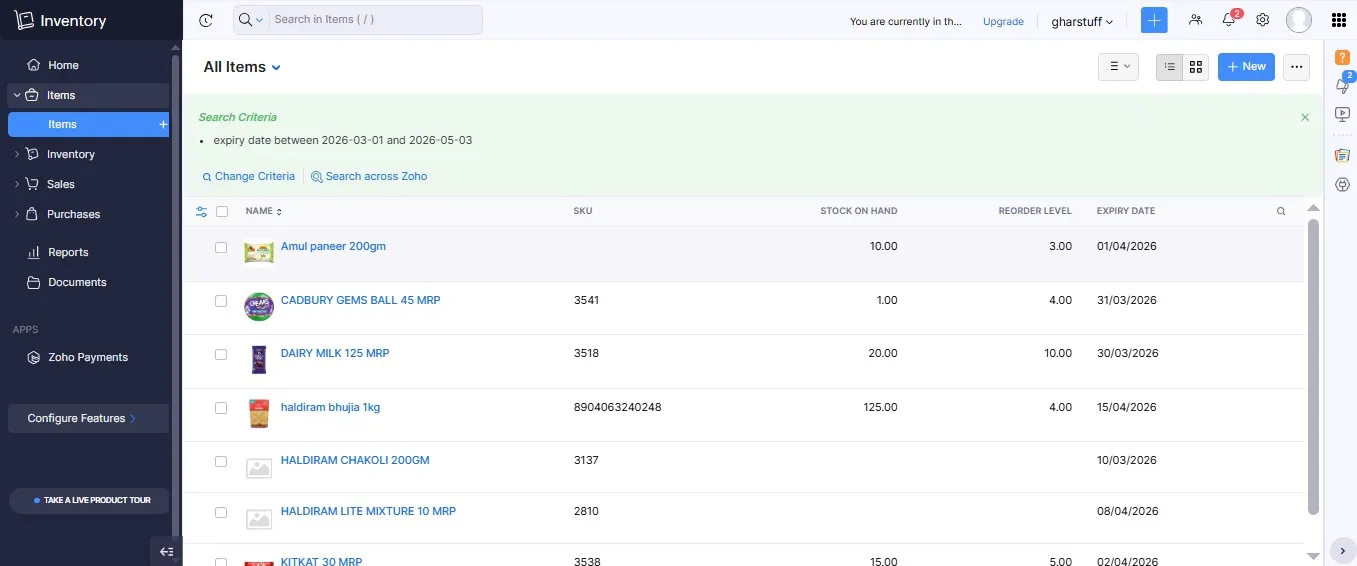
I’ve been using Zoho Inventory at gharstuff.com for over a year. It’s the backbone of my stock management. The free plan — 50 orders/month, 1,000 SKUs, 1 user, forever free — is genuinely usable for a small store. It’s the only tool on this list where the free version looks and works like real inventory software, not a demo or a nerfed trial.
What the Free Plan Actually Includes
| Feature | Free Plan | Notes |
|---|---|---|
| Orders/month | 50 | Sales + purchase orders combined |
| Users | 1 | Just you — staff can’t have their own login |
| SKUs | 1,000 | More than enough for most small retail |
| Warehouses | 1 | Single location only |
| Batch + expiry tracking | ✅ Yes | Every batch gets its own expiry date |
| Reorder points | ✅ Yes | Manual alerts — flags when stock falls below threshold |
| Purchase orders | ✅ Yes | Track what you ordered from suppliers |
| Barcode scanning | ✅ Yes | Works with any Bluetooth scanner |
| API access | ✅ Yes | 1,000 free calls/day — rare on a free plan |
| Ecommerce integrations | ✅ Yes | Shopify, Amazon, eBay, Etsy |
| Automated expiry alerts | ❌ Paid only | The Python workaround below solves this for free |
| Workflow automation | ❌ Paid only | Custom rules need Standard ($39/mo)+ |
The Feature Gap That Actually Matters — And the Fix
Automated expiry date alerts — the feature that saves a grocery store thousands per month in waste — are paid only on Zoho. For a store selling fresh produce, dairy, or anything perishable, this is a real gap.
My fix: I built a Python script that uses Zoho’s free API (1,000 calls/day) to send expiry alerts automatically. Runs on my laptop every morning at 7am via Task Scheduler. Colour-coded dashboard: 🔴 Critical (≤3 days), 🟠 Warning (≤7 days), 🟡 Approaching (≤14 days), 🟢 Safe (14+ days). It does what Zoho charges $39+/month for — at $0. Full script and setup instructions are in the Zoho Inventory setup guide — free download.
📈 Real result: After switching from a paper notebook to Zoho Inventory’s free plan, stockouts dropped from 11/month to 3/month (73% fewer). Inventory tracking time dropped from 12 hours/week to 4 hours. These are tracked numbers from gharstuff.com — 60+ days before and after.
Zoho Free Plan: What Works
- Genuinely full-featured for under 50 orders/month
- 1,000 SKU limit covers most small retail
- Batch-level expiry tracking included
- API access on free plan (unique in this category)
- Clean interface — Vishal learned it in one afternoon
- Ecommerce sync (Shopify, Amazon, Etsy) free
Zoho Free Plan: Real Limitations
- 50 orders/month cap — grocery stores hit this quickly
- Single user — can’t share login with staff
- No automated workflows without Python workaround
- Cloud-only — limited offline functionality
- Email-only support on free plan
💰 New user bonus
Sign up through this link and get $100 in Zoho Wallet credits — free plan stays free forever. Credits apply if you ever upgrade past 50 orders/month.
Try Zoho Inventory Free → Get $100 CreditsVerdict: For any small retail or grocery store doing under 50 orders/month, Zoho Inventory free is the answer. Full setup walkthrough — CSV import, reorder points, Python expiry alerts — is in my Zoho Inventory setup guide.
2. Square Inventory — Best Free Option for US In-Person Retail
✅ Best for: Pop-ups, market stalls, small shops already using Square POS for payments
⚠️ Not for: Stores needing expiry tracking, purchase order management, API access, or Indian stores
Square’s free plan gives you genuine inventory tracking — unlimited products, low-stock alerts, variant tracking, and a mobile POS — all at $0 for the software. Every sale through Square automatically deducts from stock. For a US store already using Square for payments, this is the most seamless option because there’s no separate setup.
The catch is the transaction fee. 2.6% + 15¢ per in-person transaction isn’t a software cost — it’s payment processing. On $10,000/month in sales, that’s $275/month in fees. You’re not paying for inventory software; you’re paying Square to process payments, and inventory tracking comes bundled in.
⚠️ Fund hold warning for US stores: Square has a documented pattern of holding funds (90–180 days) for accounts flagged by their automated risk system. Over 3,200 BBB complaints relate to this issue. The inventory software is solid — the payment processing risk is real and worth understanding before you make Square your primary processor. See the full breakdown in my POS systems guide.
Square Free: What Works
- Unlimited products — no SKU cap
- Auto stock deduction on every sale
- Zero additional setup if already on Square POS
- Low-stock alerts included
- Strong mobile app (4.7/5 on both stores)
- Free online store builder included
- No chargeback fees (rare in this category)
Square Free: Real Limitations
- Transaction fees add up — not truly $0 at volume
- No batch-level expiry tracking
- No purchase orders on free plan
- Fund hold risk for high-volume accounts
- Advanced inventory requires $49+/mo Square for Retail
- Not available in India
Verdict: Good free inventory software for US storefront retail if you’re already comfortable with Square’s payment fees and risks. Not the right choice if you need purchase orders, expiry tracking, or want to avoid transaction-based pricing.
3. Sortly — Best Visual Inventory Tracker (Limited Free Plan)
✅ Best for: Equipment tracking, small stock rooms under 100 items, visual-first inventory
⚠️ Not for: Any retail store with more than 100 product types, stores needing free low-stock alerts or expiry tracking
Sortly is a visual inventory app — every item gets a photo, and the interface is built around images rather than spreadsheets. The most user-friendly tool on this list for non-technical staff. Vishal understood it in about 10 minutes because he didn’t need to read SKU codes — he could see the product image and tap it.
But 100 item types on the free plan is the dealbreaker for most retail stores. I use Sortly at gharstuff.com not for product inventory but for equipment tracking: refrigeration units, scales, delivery bike, POS hardware. Anything that doesn’t go through the register but needs to be tracked. For that use case — it’s genuinely good.
Sortly Free: What Works
- Best mobile app in this category — clean and fast
- Photo per item — visual interface staff love
- QR code generation included
- Works offline
- In-app barcode scanner (phone camera)
Sortly Free: Real Limitations
- 100 items — impractical for any real product inventory
- No low-stock alerts on free plan
- No expiry tracking on free plan (paid only)
- No purchase orders or supplier management
- Not designed for grocery or retail stock at scale
Verdict: Don’t use Sortly as your primary inventory system if you sell physical products at volume. Use it for equipment and asset tracking alongside Zoho. For the full head-to-head comparison of both tools for retail use: Zoho vs Sortly for small retail.
4. SalesBinder — Best Free Option for Multi-Location Businesses
✅ Best for: Multi-location businesses, wholesale distributors, stores that need invoicing + inventory combined
⚠️ Not for: Stores wanting a modern mobile interface, businesses needing expiry tracking or API access
SalesBinder is a lesser-known tool with a genuinely generous free plan — unlimited locations, CSV import, invoicing, and basic CRM features all included. It’s built more for B2B wholesalers than retail, but if you manage inventory across multiple godowns, warehouses, or retail locations, it’s the only tool on this list that handles that for free.
SalesBinder Free: What Works
- Unlimited locations on free plan — unique on this list
- Built-in invoicing and basic CRM
- CSV import for easy migration
- No SKU limit on free plan
SalesBinder Free: Real Limitations
- Interface feels like 2015 software — Vishal needed help navigating
- No mobile app — web-based only
- No expiry tracking or batch management
- No automated low-stock alerts
- Not practical for daily grocery stock movement
Verdict: Worth considering if you manage multiple locations and need invoicing + inventory in one tool. Not suitable as the primary system for a busy grocery store — the interface is too slow for daily use and the missing mobile app is a real problem.
5. Stockpile — Truly Unlimited Free, But Very Basic
✅ Best for: Stores that need completely free, no-limits quantity tracking and nothing else
⚠️ Not for: Stores needing alerts, automation, expiry tracking, or any integration
Stockpile is legitimately free — no limits, no paid tier, no upsells. Unlimited users, unlimited items, unlimited locations. The most generous free plan on this list in raw capacity. But the features stop at basic quantity tracking.
I include it because it fills a specific gap: stores that need more than Sortly’s 100-item limit but find Zoho overwhelming on day one. Stockpile is a useful stepping stone, not a destination.
Stockpile: What Works
- Truly free — no plans, no credit card, no upsells
- Unlimited items and users
- Simple interface — minimal training needed
Stockpile: Real Limitations
- Manual entry only — no barcode scanning, no API
- No low-stock alerts
- No expiry tracking
- No e-commerce integrations
- Becomes unworkable above 300 SKUs with daily movement
Verdict: A useful backup option if Zoho feels like too much on day one. Not a long-term system for any retail store with daily stock movement.
6. Odoo Community — Most Powerful Free Inventory Software (For Technical Users)
✅ Best for: Businesses needing full ERP, double-entry inventory, multi-module operations — with technical skills
⚠️ Not for: Solo store owners without technical comfort, stores wanting setup in under an hour
Odoo Community is the most capable free inventory system that exists. Unlimited SKUs, unlimited users, double-entry inventory tracking, automated reorder rules, purchase orders, vendor bills, barcode scanning, multi-warehouse — all free if you self-host on a VPS ($10–15/month).
I evaluated Odoo for gharstuff.com and chose not to use it — not because it’s bad, but because Zoho’s free plan covered my needs without requiring me to provision a Linux server on a weekend when I also had 200 orders to pack. If I had a developer on staff, Odoo would be the answer for a growing store that wants to avoid per-seat pricing forever.
Odoo Community: What Works
- Truly unlimited — SKUs, users, orders, warehouses
- Full ERP: inventory + accounting + CRM + sales in one
- Double-entry inventory (strongest on this list)
- Automated reorder rules included
- Large community — forums, tutorials, YouTube walkthroughs
- You own your data completely
Odoo Community: Real Limitations
- Setup takes a full weekend minimum
- Requires Linux VPS ($10–20/month hosting)
- You manage your own backups and updates
- Support is community forums only
- Too complex for non-technical store owners
Verdict: If you have technical skills or a developer friend, Odoo Community is the most powerful free inventory management software for small business on this list. If you don’t, the time cost is too high when you’re also doing deliveries and GST returns.
7. Vyapar — Best Free Billing + Basic Inventory for Indian Stores
✅ Best for: Indian kirana and grocery stores needing GST-compliant billing on Android at ₹0
⚠️ Not for: iOS users, stores outside India, businesses needing advanced inventory depth or API access
Vyapar is India’s most popular free billing app — used by over 1 crore businesses. The free Android plan includes GST billing, basic inventory tracking, WhatsApp invoice sharing, and offline mode. For an Indian kirana store, it handles the customer-facing billing side better than any other free tool on this list.
The supplier quote I mentioned in my Vyapar review captures it well — my dal/atta supplier saw the invoice I generated and said “bhai, ab mujhe bhi aise invoice chahiye.” That reaction tells you something about how professional the output looks compared to what most kirana stores were using before.
Vyapar Free: What Works
- GST-compliant invoices in under 60 seconds
- WhatsApp invoice sharing built in
- Offline mode — works without internet
- Free forever on Android (single device)
- Basic stock tracking alongside billing
Vyapar Free: Real Limitations
- Basic inventory only — no batch expiry, no reorder automation
- No iOS app as of May 2026
- No API — can’t connect to other tools
- Single device on free plan
- Not suitable outside India
Verdict: For Indian stores, Vyapar is the best free billing tool — but it’s not an inventory management replacement. The best setup is Vyapar for billing + Zoho Inventory for stock management. Full configuration details are in my Vyapar review.
My 3-Tool Setup at gharstuff.com — ₹0/Month Total
After testing all 7 tools, here’s what actually runs daily at my grocery store in Hisar. No single free tool does all three jobs well — this combination covers everything:
Zoho Inventory Free (₹0/month) manages stock levels, batch expiry, and reorder points — and powers the Python script via API. Vyapar Free (₹0/month) handles customer-facing GST billing and WhatsApp invoice sharing. Python script (₹0) runs every morning at 7am, pulls expiry data from Zoho, and sends colour-coded alerts. Total monthly cost: ₹0. One-time setup: 2 days (Python) + 40 minutes (Vyapar) + 20 minutes (Zoho).
Why not a single tool? Zoho is the best free inventory manager but weak on GST billing for India. Vyapar is the best free billing app but has no inventory depth. The Python script fills the automation gap that paid software charges ₹3,200–8,200/month for. Together: complete coverage at ₹0/month.
When to Stop Using Free Inventory Software
| Trigger | What to Do |
|---|---|
| Consistently hitting 50 orders/month on Zoho free | Upgrade to Zoho Standard ($39/mo) — adds 500 orders, 2 users, automations |
| Need automated expiry/reorder alerts without Python workaround | Zoho Standard — or keep using the free Python script |
| Need second staff login | Zoho Standard (2 users included) |
| Multi-location tracking needed | Zoho Professional ($79/mo) — 4 warehouses, serial tracking |
| Google Sheets taking 3+ hours/week to maintain | Migrate to Zoho free immediately — setup takes one afternoon |
| Time spent on manual inventory work costs more than software | $39/month pays for itself if it saves you 2+ hours/week |
Before vs After: Real Numbers From Switching Free Inventory Software
gharstuff.com — Paper Notebook → Google Sheets → Zoho Free Plan
| Metric | Paper Notebook | Google Sheets | Zoho Free Plan |
|---|---|---|---|
| Stockouts/month | 11 | 3 (73% fewer) | 3 (maintained) |
| Inventory time/week | 12 hours | 6 hours | 4 hours (67% less vs paper) |
| Near-expiry waste/month | ₹12,000 ($145) | ₹3,800 ($46) | ₹3,200 ($38) |
| Monthly software cost | ₹0 | ₹0 | ₹0 (still free) |
The move from paper to Google Sheets did most of the heavy lifting. The move to Zoho free added barcode scanning, purchase order tracking, and batch expiry management — things Sheets genuinely can’t do. Both moves cost ₹0.
I used Google Sheets for gharstuff.com from 2019 to mid-2023. It worked until it didn’t. The moment I knew it was over: a Saturday afternoon where I realised my “inventory system” was a spreadsheet that Vishal was updating with a pen and paper and I was transcribing. 11 stockouts that month. ₹12,000 in expired stock. I set up Zoho the following Monday.
My full Google Sheets inventory template — the one that reduced stockouts 73% before I migrated to Zoho — is a free download in the Google Sheets inventory template guide. It’s still a valid starting point for stores under 200 SKUs.
These inventory tools work best when paired with AI tools for demand forecasting and restocking. I cover 15 free AI tools that work alongside your inventory system in the free AI tools for small retail guide. The combination of Zoho + ChatGPT prompts + reorder point formula is what cut stockouts 73% at gharstuff.com.
FAQ — Free Inventory Management Software for Small Business
Q1: Is there truly free inventory management software for small business — not just a trial?
A: Yes. Zoho Inventory has a forever-free plan (50 orders/month, 1,000 SKUs, 1 user) with no time limit. Sortly’s free plan covers 100 items permanently. Square’s free POS includes unlimited-product inventory tracking. Stockpile is fully free with no limits or paid tier. Odoo Community is open-source and unlimited if self-hosted. These are not trials — they don’t expire.
Q2: What is the best free inventory management software for a small grocery store?
A: Zoho Inventory’s free plan — it’s the only free tool that includes batch-level expiry tracking, reorder points, purchase order management, and API access at $0. The 50 orders/month limit is the constraint to watch. For Indian grocery stores, pair it with Vyapar (free Android) for GST billing. The combination costs ₹0/month total.
Q3: What happened to inFlow’s free plan?
A: inFlow discontinued its free On-Premise edition in July 2024. inFlow Cloud (their current product) starts at $129/month with a 14-day free trial only. Any article recommending “inFlow free” after mid-2024 is outdated. It’s off this list for that reason.
Q4: Can I manage 500+ SKUs on a free inventory system?
A: Yes. Zoho Inventory’s free plan supports up to 1,000 SKUs. Odoo Community and Stockpile are unlimited. Google Sheets handles 500+ SKUs but becomes time-consuming to maintain manually above 200 SKUs with daily stock movement. Sortly (100 items) is not suitable for 500 SKUs on the free tier.
Q5: Is Google Sheets a good free inventory management tool for small business?
A: For stores under 200 SKUs with low daily stock movement — yes, it’s a legitimate starting point. For a grocery store with 500+ SKUs and daily perishable arrivals, manual data entry becomes a full-time job. My free Google Sheets template handles reorder points, expiry tracking, and low-stock alerts with formulas — it cut stockouts 73% before I migrated to Zoho. But at scale, migrate to Zoho free.
Q6: Can I track expiry dates with free inventory software?
A: Yes — but only Zoho Inventory offers batch-level expiry tracking on its free plan. Sortly requires the Premium plan ($49/month) for expiry features. Vyapar, Square, SalesBinder, and Stockpile do not offer expiry tracking on their free tiers. The Python workaround for Zoho’s free plan also adds automated expiry alert emails at $0 — full script is in the Zoho setup guide.
Q7: What’s the best free inventory app for Indian kirana stores?
A: Vyapar is the best free billing + basic inventory app for Indian kirana stores — GST invoicing, WhatsApp invoice sharing, and offline mode on Android at ₹0. Pair it with Zoho Inventory’s free plan for inventory depth. Total cost: ₹0/month. Full setup in the Vyapar review.
Q8: When should I stop using free inventory management software and upgrade?
A: Upgrade from free when: you’re consistently hitting the 50 orders/month limit on Zoho, you need a second staff login, you need automated reorder/expiry alerts without a technical workaround, or your time spent on manual inventory work costs more than the software subscription. Zoho Standard at $39/month pays for itself if it saves 2+ hours per week.

About the Author
Rahul Saini
Grocery store owner in Hisar, India, running gharstuff.com since 2019 with 800–1,200 SKUs daily. I test AI tools in my real store — with real staff, real customers, and real consequences when something doesn't work. Every number on this site is from my actual store.
Read My Full Story →📥 Free Inventory Toolkit — Templates + Zoho Setup Files
Google Sheets inventory template (119 formulas, 4 tabs), Zoho setup checklist, Python expiry alert script, and ChatGPT prompt library. All free, all tested at gharstuff.com with 800+ SKUs.
Free. No spam. Unsubscribe anytime.
🔗 Disclosure: This article contains affiliate links to Zoho Inventory and Vyapar — marked with “sponsored nofollow.” I use Zoho daily at gharstuff.com. Sortly, Square, SalesBinder, Stockpile, and Odoo are not affiliate relationships. All verdicts reflect my actual testing. Full disclaimer →