
🔄 Last updated: April 13, 2026
This Google Business Profile small retail guide covers every step of setup, verification, and ranking — tested in a real grocery store that went from invisible to appearing in “near me” searches within one week.
$0 cost • 20-minute setup • Real results from a real grocery store • Step-by-step with screenshots
⚡ Quick Verdict
This single free tool brought me more new walk-in customers than any paid ad I’ve ever run.
📊 My Real Results — Before vs After Setting Up GBP
💰 Cost: $0 · Setup: 20 minutes · First customer found me in 1 week
📚 Table of Contents
The “Near Me” Moment — Why Your Store Needs to Be on Google
A customer walked into my store one afternoon and said, “I found you on Google Maps.” I almost asked him to repeat it. In five years of running my grocery store in Hisar, that had never happened. Not once.
I’d set up Google Business Profile properly three weeks earlier. My store had existed for years — on the street, in the neighbourhood, in my customers’ memories — but on Google it simply didn’t exist. I wasn’t in any “near me” results. I wasn’t on Maps. For anyone searching for a grocery store in my area, I was invisible.
Setting up Google Business Profile small retail takes 20 minutes and is the single highest-ROI free action a store owner can take in 2026. Every minute of setup time pays for itself in foot traffic that would otherwise walk into a competitor.
I covered GBP as Tool 15 in my 15 best free AI tools for small retail guide — this is the complete step-by-step setup walkthrough with everything I learned from setting it up in my real store.
Big retail chains have SEO teams, ad budgets, and dedicated marketing staff. You have this free tool and 20 minutes. That’s the only advantage you need for local search.
Why Most Small Retail Stores Fail on Google Business Profile
Most small store owners create a Google Business Profile once — and then forget about it. That’s exactly why they don’t get customers from it.
I’ve looked at dozens of local grocery and convenience store listings in various cities. The pattern is almost always the same:
Google treats inactive profiles as low-priority. It’s not enough to just exist on Google — you have to signal that you’re an active, operating business. The algorithm rewards stores that post regularly, respond to reviews, and keep their photos updated.
⚠️ The uncomfortable truth: Your competitor down the street may be worse at running their store than you — but if their GBP profile is more active than yours, they will appear above you in local search results. Activity beats quality in the algorithm.
The good news: most small retail stores do almost none of this. Which means if you follow the steps in this guide consistently for 30 days, you will be ahead of the majority of your local competitors — at zero cost.
What Is Google Business Profile — And Why It Matters in 2026
Google Business Profile (formerly Google My Business) is a free listing that puts your store on Google Search and Google Maps. When someone nearby searches “grocery store near me” or “convenience store open now,” the top results they see are not websites — they’re Google Business Profile listings.
These top three local results are called the “local 3-pack” — the map with three business listings directly below it. Getting into that 3-pack for your category is worth more than any paid search ad for a local retail store.
| What Your Listing Shows | Why It Matters |
|---|---|
| Store name, address, phone | Customers find and contact you instantly |
| Opening hours | Customers know you’re open before they walk over |
| Star rating and reviews | Social proof that converts searchers to visitors |
| Photos of your store | Visual trust — customers know what to expect |
| Products and prices | Mini-catalogue visible before they arrive |
| Google Posts (weekly) | Free promotional content in search results |
| Direction requests | One tap to navigate directly to your door |
2026 update: Google’s AI Overviews now pull from GBP reviews and photos to recommend local shops in conversational search. Active, well-maintained profiles get pulled into AI recommendations — inactive ones don’t. This makes keeping your profile updated more important than ever.
🇺🇸 🇬🇧 🇦🇺 This works the same everywhere. I run my store in Hisar, India. But every tip in this article applies equally to a corner shop in Manchester, a convenience store in Ohio, or a grocery store in Melbourne — because Google’s local algorithm works identically in every country.
The screenshots are from my Indian store. The numbers are in Indian rupees. But the GBP dashboard, the verification process, the ranking factors, the photos — they’re the same worldwide. If you’re in the US, UK, or Australia, skip the split-hours note (unless you take an afternoon break) and everything else works exactly as described.
In fact, GBP is stronger in English-speaking markets because Google has more local data to work with. So if you’re reading this from London or Los Angeles, this guide is for you too.
What You Need Before You Start
Get these ready before you open business.google.com — the setup takes 20 minutes if you have everything on hand, and 45 minutes if you’re looking things up mid-process.
| What You Need | Notes |
|---|---|
| Google account | Use a business email if you have one — not a personal Gmail |
| Exact store name | Exactly as it appears on your signage — spelling, spacing, everything |
| Physical store address | Full address including PIN/postcode/zip |
| Store phone number | The one you actually answer |
| Store hours | Including split hours if you close in the afternoon |
| 3–5 photos | Ready on your phone — storefront, interior, one product section |
| Business category | Think about this in advance — it’s the most important field |
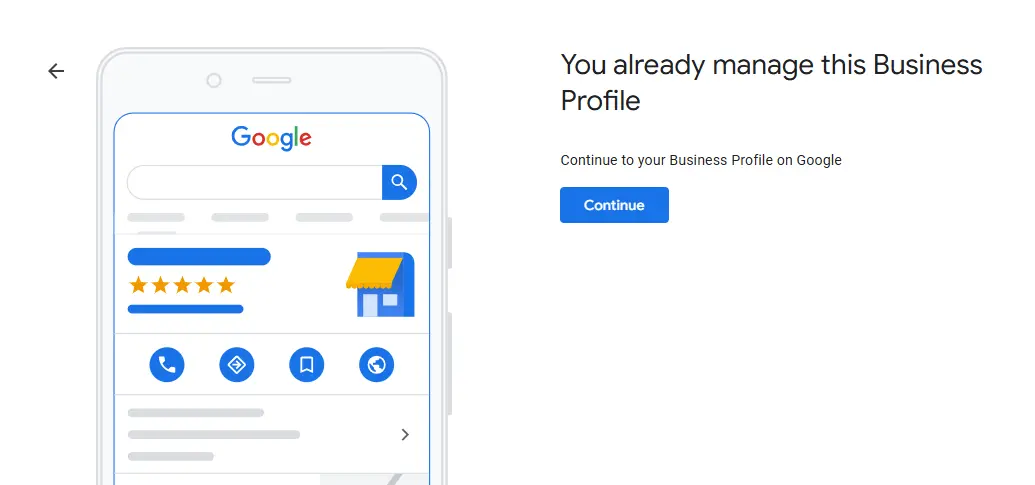
⚠️ Check first: Your store may already exist as an unclaimed Google listing — Google often creates listings automatically from public data. Search your store name before creating a new one. Claiming an existing listing is faster than creating from scratch, and avoids duplicate listings.
10-Step Setup Guide — Complete Walkthrough
Follow these steps in order. Don’t skip verification (Step 4) or photos (Step 6) — they’re the two steps most store owners skip and the two that matter most for ranking.
Step 1: Claim or Create Your Business Listing
Go to business.google.com and sign in with your Google account.
In the search box, type your store name. If it appears — click it and select “Claim this business.” If it doesn’t appear — select “Add your business to Google.”
💡 Category is the most important field in this entire setup. Use the most specific category available — “Grocery Store” not “Food Store,” “Convenience Store” not “Retail Store.” This single field determines which searches you appear in. Spend 2 minutes finding the right one. Check what 2–3 nearby competitors use in their GBP listings and match the most specific option.
Step 2: Add Your Location and Map Pin
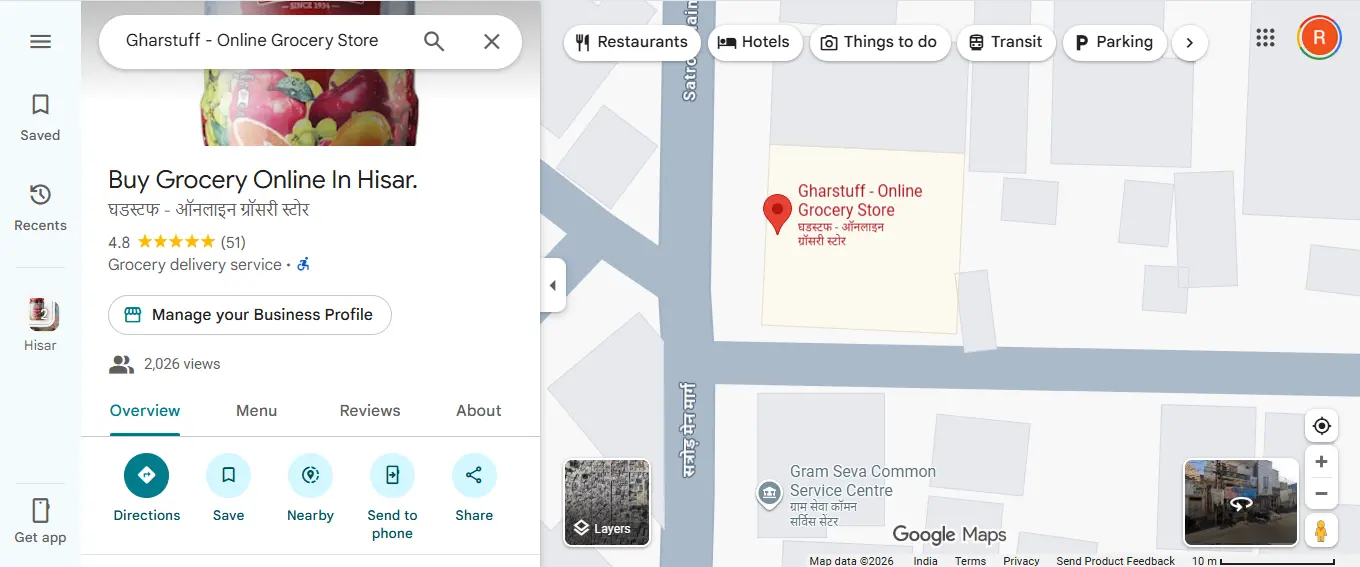
Enter your full store address. Then drag the map pin to your exact store entrance — not the centre of your building, not the parking lot. The pin should sit at the point where customers would walk in from the street.
Only add a service area if you do home delivery. If you don’t deliver, leave this blank — adding a service area when you don’t deliver can confuse Google about your business type.
⚠️ The pin matters more than most people realise. A misplaced pin sends customers to the wrong location. One confused customer who can’t find you is a lost sale and potentially a bad review. Take 60 seconds to drag the pin precisely.
Step 3: Set Your Business Hours
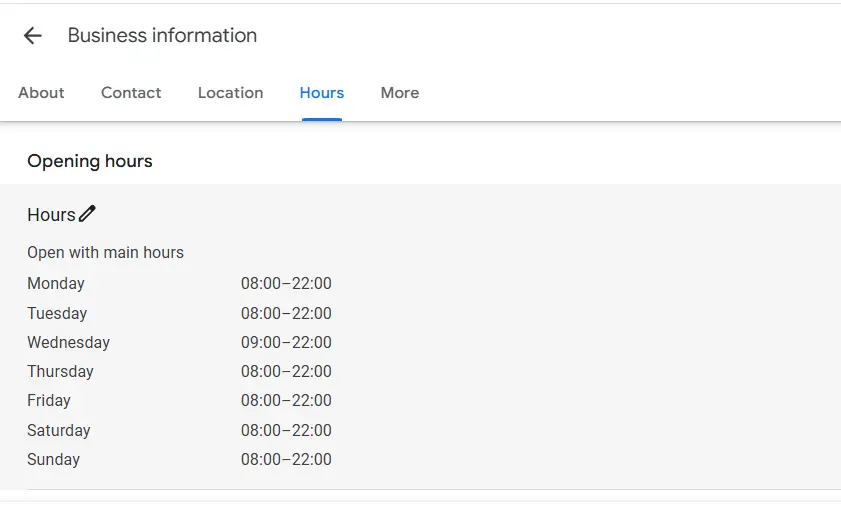
Enter your regular weekly hours. Then set special hours for holidays — Google will prompt you before major holidays in your country.
💡 For Indian stores with an afternoon break: Enable split hours — for example, 9am–1pm and 4pm–9pm. This is critical. Without split hours, Google marks you “Closed” during your afternoon break and customers searching at 2pm see your competitor instead. This one setting has cost many Indian store owners hundreds of customers they never knew they lost.
For US/UK/AU stores: confirm your timezone is correct, especially if you’re near a timezone boundary. A wrong timezone shows incorrect hours to customers in a different zone.
Step 4: Verify Your Business
Verification tells Google you actually operate at the address you’ve entered. Without it, your listing has limited features and ranks lower. It’s worth completing even if it takes a few days.
| Verification Method | How It Works | Timeline |
|---|---|---|
| Video verification | Short video of storefront and interior | 1–3 days (most common in 2026) |
| Phone call | Automated call with a 5-digit code | Instant (for some accounts) |
| Code sent to your business email | Instant (for some accounts) | |
| Postcard by mail | 5-digit code mailed to your address | 5–14 days |
Video verification is the most common method in 2026. Here is the exact script that works — I used this myself:
1. Show your street sign or nearby landmark
2. Walk toward your store entrance
3. Unlock and open the door
4. Walk to your billing counter
5. Hold up a recent supplier invoice showing your store address
6. Pan slowly across your store shelves
This proves you physically operate at that location. Keep the video steady and well-lit. Daytime works best.
⚠️ Don’t edit your listing while waiting for verification. Changing your address, name, or category while a verification is in progress can cancel it and restart the process from the beginning.
Step 5: Write Your Business Description
You have 750 characters. Use them. This description appears in your Knowledge Panel when someone searches your store name — it’s your one chance to tell a potential customer why they should choose you over the grocery store down the road.
Structure that works: What you sell → what makes you different → location and convenience → one call to action. Include your city name, store type, key products, and any services like delivery.
My actual description: “Family-run grocery store serving Hisar since 2019 with 1,200+ products — fresh dairy restocked daily, local produce, and packaged goods. Near-expiry items always marked 30% off. Open 7 days. WhatsApp us for delivery enquiries.”
If you’re stuck writing yours, use this ChatGPT prompt:
We sell [your main products].
Our unique selling point is [what makes you different].
We also offer [any service like delivery or fresh daily stock].
Friendly, local tone. No corporate language.
Step 6: Add Photos — The Step That Actually Gets You Customers
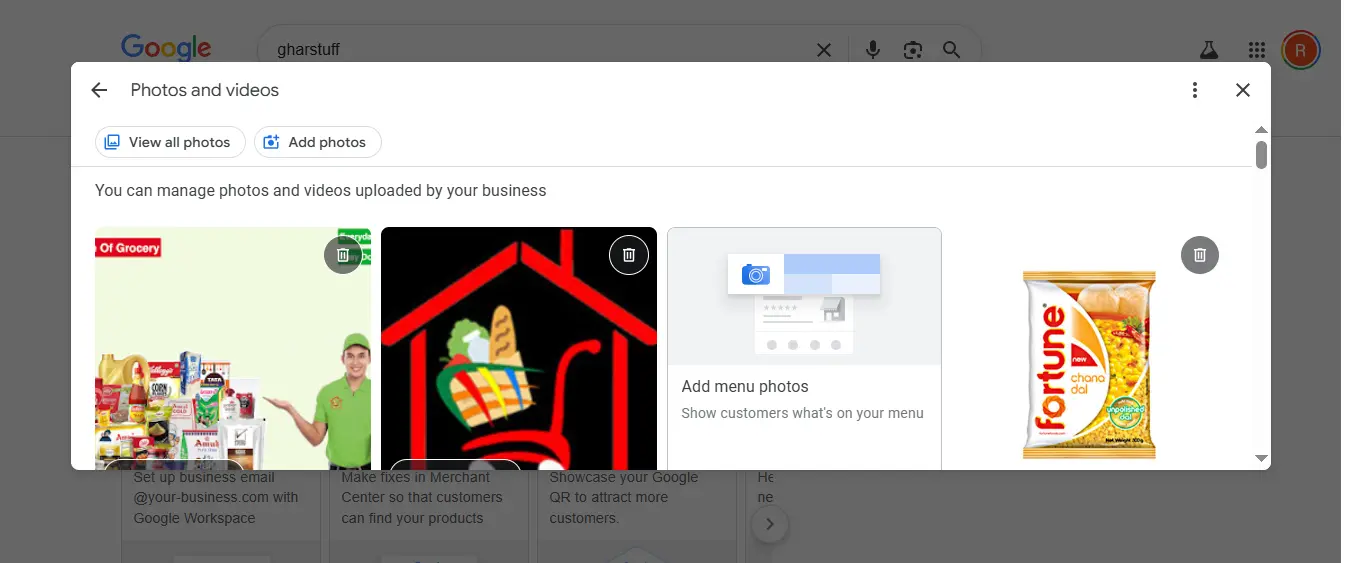
Photos are the single biggest factor in whether a customer chooses your store over a competitor after finding both in search results. A listing with good photos converts at 2–3x the rate of one without. These are the 5 photos every store needs on day one:
| Photo | What to Show | Why It Matters |
|---|---|---|
| Exterior (daytime) | Storefront with your sign clearly visible | Customers recognise you when driving or walking past |
| Interior overview | Wide shot from just inside the entrance | Shows store layout and type before they visit |
| Best product section | Your freshest, most visually appealing section | Visual proof of quality and stock freshness |
| You or your staff | Behind the counter or in the store | Single biggest local trust signal — humans buy from humans |
| Storefront with hours | Hours visible on your door or window | Confirms listing accuracy for customers |
💡 The Vishal Photo Strategy: I trained Vishal to photograph three things every Tuesday morning — fresh stock that arrived that week, the storefront with current signage, and one product section. Takes 5 minutes. We now have 40+ photos in our listing. Google rewards active listings with fresh photos by showing them higher in results. Your competitor who set up GBP once and never touched it again is losing to you because of this one habit.
Step 7: Add Your Products
In your GBP dashboard, click Products in the left menu. Add main categories first — Fresh Dairy, Packaged Goods, Fresh Produce, whatever your store carries. Then add 3–5 specific products per category with photos and prices.
This creates a mini-catalogue visible directly in your Google search results — customers see what you sell before they visit. It also pushes your listing to take more visual space in results, pushing competitors further down the page.
You don’t need to list every product. Add your top 10–15 bestsellers and the products that are hardest to find elsewhere. I check my Zoho Inventory dashboard to see which products have the highest sales velocity before deciding what to feature here.
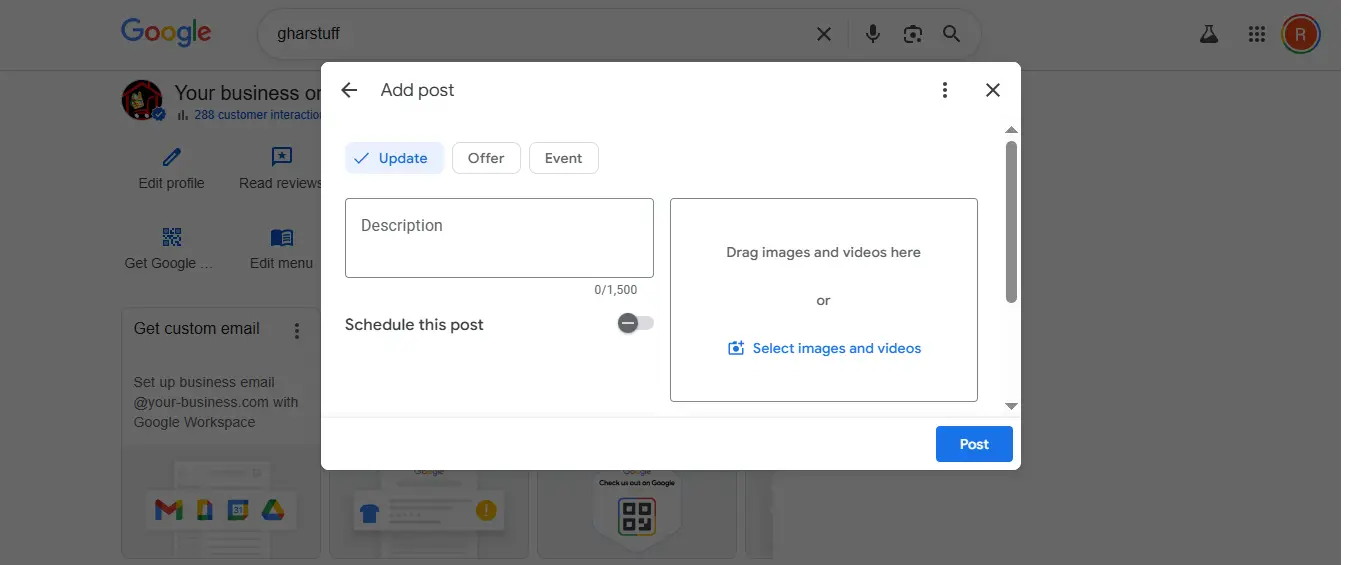
Step 8: Google Posts — Your Free Weekly Advertisement
Google Posts are free promotional content that appears in your search listing. There are four types: What’s New, Offer, Event, and Product. Posts expire after 7 days — which means you post weekly, and your listing always looks active and current.
| Post Type | Best Used For | Example |
|---|---|---|
| What’s New | New stock arrivals, seasonal items, general updates | “Fresh winter produce just arrived — carrots, spinach, and cauliflower restocked this morning” |
| Offer | Promotions with start and end dates | “30% off near-expiry paneer this week only — expires [date]. First come first served.” |
| Event | In-store events, community activities | “Free tasting session this Saturday — new flavours of [product] available” |
| Product | Highlight a specific bestseller or seasonal item | “Our most popular item this month: [product] — always fresh, always in stock” |
My Monday morning routine: I create one post — usually a near-expiry discount offer or a fresh stock arrival announcement. I use a Canva template I made once and just change the product name and price each week. Takes 3 minutes.
If you’re not sure what to post, use this ChatGPT prompt:
Include: discount offers, new arrivals, seasonal products, local community content.
Each post should be under 150 words.
Friendly, local tone — write as if you’re talking to neighbourhood customers.
Step 9: Get Reviews and Respond to Every Single One
Reviews are the most powerful ranking factor in Google’s local algorithm — and the most powerful trust signal for customers deciding between two stores. Here’s how to get your first five without being awkward about it.
After a positive interaction — not at the end of a transaction. “If you’ve got a moment, a Google review would really help us.”
Message your 10 most regular customers with your direct review link. One message. Keep it short and personal.
Generate a free QR code at qr-code-generator.com linking to your review page. Print it A5, laminate it, place at billing. Customers scan it while paying. Review written in 30 seconds while the experience is still fresh.
Responding to reviews is not optional. Respond to every review — positive and negative — within 24 hours. Here are the prompts I use:
⚠️ Never incentivise reviews with discounts, gifts, or free products — Google prohibits this and can suspend your listing.
💡 The rule that matters most: One graceful, empathetic response to a bad review builds more customer trust than ten positive reviews. Customers read how you handle complaints before they ever visit your store. Your response is a public display of how you treat people.
🤖 How AI Saves You Time on Google Business Profile
Managing your GBP profile manually — writing descriptions, crafting review replies, coming up with post ideas every week — can feel like another job on top of running your store. This is where AI cuts the time down to almost nothing.
| Task | Without AI | With AI | What to Ask ChatGPT |
|---|---|---|---|
| Write description | 20–30 min | 2 min | Use the prompt in Step 5 above |
| Reply to positive review | 5 min | 30 sec | “Write a warm thank-you reply to a 5-star review mentioning [what they said]. Under 50 words.” |
| Reply to negative review | 15 min (stressful) | 1 min | “Write a professional response to a negative review about [issue]. Acknowledge, apologise, invite offline contact. Under 60 words.” |
| Weekly post ideas | 10 min | 1 min | “Give me 4 Google Post ideas for a grocery store this week. Include a discount offer, new arrival, seasonal item, and product highlight.” |
The GBP app itself also has built-in AI suggestions for review responses — when you open a review to reply, Google suggests template responses. I use these as a starting point and personalise them in 60 seconds per review instead of 5 minutes.
💡 The compound effect: Spending 10 minutes on AI-assisted GBP tasks every Monday morning — one post, two review replies, two new photos — adds up to 40+ profile activities per month. That level of consistent activity is what separates stores that rank in the 3-pack from stores that don’t appear at all.
Step 10: Check GBP Insights Every Monday Morning
GBP Insights shows you exactly how customers are finding and interacting with your listing. It takes 3 minutes to review and gives you information you can’t get anywhere else for free.
| What to Look At | What It Tells You | What to Do With It |
|---|---|---|
| Direction requests | How many people navigated to your store | If they spike on a specific day, be fully stocked that day |
| Search terms | What people typed to find you | Add popular search terms to your description naturally |
| Photo views | Which photos get the most attention | Keep those products well-stocked and prominent in-store |
| Direct searches | People who searched your name specifically | Sign of brand awareness growing |
| Discovery searches | People who found you through a category search | Your ranking for “near me” type searches |
| Phone calls | Calls made directly from your listing | If low, check your phone number is correct |
🤖 The AI + Google Business Profile Stack — How I Use Free AI Tools Together
Most GBP guides stop at “add photos and respond to reviews.” But you’re not reading this on a generic marketing blog. You’re reading this on a site about AI tools for small retail — so here’s how I use free AI tools to run my GBP listing on autopilot:
The same ChatGPT prompts from Article 5 write my weekly Google Posts in 30 seconds. I paste a prompt, get 5 options, pick one, and publish. No writer’s block.
The discount shelf signs, product photos, and post graphics all come from Canva’s free tier. Magic Design creates professional graphics from text prompts. I saved my discount shelf template once and reuse it weekly.
Google now suggests AI-generated responses to customer reviews. I use them as a starting point — saves 2 minutes per review. Combine with the ChatGPT prompts in the free download for personalized responses.
Vishal uses Google Lens to capture expiry dates during stock-in — and those same photos become “New Arrival” posts on our GBP listing. One photo, two uses.
This is the only place on the internet where you’ll find this specific combination: ChatGPT for content, Canva for graphics, Google Lens for photos, and GBP’s built-in AI for reviews — all free, all working together. I built this stack for my store. Use it for yours.
🔗 Related: 15 Best Free AI Tools for Small Retail (2026) — this is where the AI tools come from.
The 4-Week Playbook That Actually Works
Setup is one thing. Consistency is what actually moves your ranking. Most store owners do the setup and then stop. Here’s the simple weekly system that keeps your profile active and your ranking climbing:
✅ The rule that matters most: Google rewards active businesses, not just existing ones. Your profile activity in the last 30 days weighs more than your profile age. A store set up last month that posts weekly will outrank a store set up 3 years ago that hasn’t posted since.
| Week | Focus | Tasks | Time |
|---|---|---|---|
| Week 1 | Foundation | Upload 5 real photos (storefront, interior, products, staff) · Publish first What’s New post | 20 min |
| Week 2 | Social Proof | Ask 5 loyal customers for a review (QR code or WhatsApp) · Reply to all existing reviews | 15 min |
| Week 3 | Content | Upload 3 new photos (fresh stock, storefront) · Publish an Offer post (near-expiry discount) | 10 min |
| Week 4 | Optimise | Check GBP Insights — which searches found you, which photos got views · Add 5 more products to catalogue | 15 min |
| Week 5+ | Maintain | 1 post per week · 2–3 photos per week · Respond to all new reviews within 24 hours · Check Insights monthly | 10 min/week |
Most of your local competitors won’t do even 20% of this. That’s the opportunity. The stores appearing in the local 3-pack aren’t necessarily better stores — they’re just more consistent on GBP.
📈 How to Rank Higher in “Near Me” Searches
Google’s local ranking algorithm considers three things: relevance (does your category match the search), distance (how close you are to the searcher), and prominence (how active and trusted your listing is). You can’t control distance, but you can control everything else.
| Ranking Factor | What to Do | Impact |
|---|---|---|
| Reviews | Get 5+ reviews in first month, respond to all within 24 hours | 🔴 Highest |
| Complete profile | Fill every single field — incomplete profiles rank lower | 🔴 High |
| Category accuracy | Most specific category that matches your store type | 🔴 High |
| Regular photos | Add 2–3 new photos every month minimum | 🟠 Medium-High |
| Weekly posts | One post per week signals active, operating business | 🟠 Medium |
| NAP consistency | Name, Address, Phone identical on Google, your website, and all directories | 🟠 Medium |
| Q&A section | Check weekly, answer questions yourself before strangers do | 🟡 Medium |
| Attributes | Enable relevant ones: in-store shopping, delivery, wheelchair access, payment methods | 🟡 Medium |
| Keywords in description | Include your city and store type naturally — not stuffed | 🟡 Lower |
💡 NAP consistency explained: NAP stands for Name, Address, Phone. Google cross-references your GBP details with every other place your store appears online — your website, directories, social media, local listings. If your phone number is different on Facebook than on Google, or your address has a different format, Google’s algorithm loses confidence in your listing. Keep all three identical everywhere.
📊 My Real Results After Setting It Up
I was expecting slow results. Local SEO usually takes months. GBP moved faster than anything else I’ve done for my store.
| Metric | Before GBP Setup | After 30 Days |
|---|---|---|
| Monthly searches showing my store | 0 | 150+ |
| Direction requests | 0 | 12/month |
| Phone calls from listing | 0 | 8/month |
| New walk-in customers from Google | 0 | 10+/month |
| Photo views | 0 | 200+/month |
Timeline of what actually happened:
| Timeframe | What Changed |
|---|---|
| Day 1–3 | Listing appears on Maps after verification |
| Week 1–2 | Appearing in searches for my store name specifically |
| Week 3–4 | Starting to appear in category “near me” searches |
| Month 2–3 | Reviews accumulate, ranking improves noticeably |
| Month 6+ | Established position in local 3-pack for category searches |
Honest caveat: results in large cities with many competitors may take longer. In a smaller city like Hisar, results came faster than they would in Mumbai, London, or New York. Give it 30 days before judging. The results do come.
❌ Common Mistakes Small Retail Stores Make with Google Business Profile
| Mistake | Why It Hurts | The Fix |
|---|---|---|
| Wrong or generic category | Most damaging mistake — shows you for wrong searches, hides you from right ones | Check 2–3 competitors, match the most specific accurate category |
| Inconsistent NAP | Confuses Google, reduces ranking confidence | Name/Address/Phone identical everywhere — GBP, website, Facebook, directories |
| No photos or outdated photos | Customers assume the business looks rundown or is closed | 5 photos minimum on day one, 2–3 new ones every month |
| Ignoring reviews | Customers choose competitors who respond | Respond to every review within 24 hours, positive and negative |
| Never posting | Inactive listing signals potentially closed business, ranks lower | One post per week, 3 minutes using a saved Canva template |
| Not completing verification | Limited features, significantly lower ranking | Complete verification even if postcard takes 2 weeks |
| Ignoring Q&A section | Strangers or competitors may add wrong answers to your listing | Check weekly, answer any new questions yourself immediately |
| Setting wrong hours | Customers arrive when you’re closed and don’t come back | Set split hours for afternoon breaks, update for every holiday |
GBP is method #1. Here are the other 9 methodsI used to go from 0 to 25+ new customers/month →
📥 Free Download: GBP Optimisation Checklist + Templates
Everything from this article condensed into one printable checklist — plus the ChatGPT prompts and review templates.
What’s included:
- ✅ 10-step setup checklist (printable)
- 📸 Photo upload guidelines with shot-by-shot guide
- 📅 Weekly posting calendar template
- 💬 Review response templates (positive + negative)
- 🤖 All 4 ChatGPT prompts from this article copy-paste ready
- 📱 QR code generator instructions and link
Enter your email to get instant access:
👉
Submit and Get Instant Access To Our Full Download Repository Right Away.
Free. No credit card. Instant access after email confirmation.
FAQs — Google Business Profile Small Retail
Is Google Business Profile really free forever?
Yes. Google Business Profile has been and continues to be completely free. There is no paid tier, no premium upgrade, and no hidden fees. Google monetises it through the ad ecosystem around it — your organic listing itself costs nothing to create, maintain, or optimise.
How long does verification take?
It depends on the method Google offers you. Video verification (most common in 2026) takes 1–3 days for Google to review. Phone verification is instant if offered. Postcard verification takes 5–14 days by mail. If you’re in a hurry, film the verification video as described in Step 4 — it’s the fastest reliable method currently available.
What if someone else already claimed my business?
This happens when a previous owner, a well-meaning family member, or even a Google bot has claimed your listing. Go to the listing and click ‘Claim this business’ or ‘Own this business?’ — you’ll be guided through a process to verify ownership. If someone actively disputes your claim, Google has a process for resolving ownership disputes through the GBP support team.
Do I need a website to use Google Business Profile?
No. Many small retail stores operate successfully on GBP alone with no website. Your GBP listing acts as your digital storefront for local searches — it shows your hours, photos, products, contact, and location. A website helps for non-local searches but is not required to benefit from GBP.
How many photos should I add?
Start with 5 on day one (see the photo table in Step 6). Then add 2–3 new photos every month. Listings with more regularly updated photos rank higher in local results. Don’t upload all your photos at once and then stop — Google rewards consistent activity over time.
Can I manage Google Business Profile from my phone?
Yes. The Google Business Profile app (available for Android and iPhone) lets you respond to reviews, post updates, check insights, and upload photos directly from your phone. I do most of my weekly GBP maintenance from my phone in under 5 minutes on Monday mornings.
How do I get more reviews without annoying customers?
Three methods that don’t feel pushy: the QR code at your billing counter (customers scan voluntarily while waiting), a WhatsApp message to your 10 most loyal customers with a direct review link (personal and appreciated), and asking in person after a genuinely good interaction — not as a routine request at checkout. Never incentivise reviews with discounts or gifts — Google prohibits this and can remove your listing.
Does Google Business Profile work for stores outside India?
Yes — it works everywhere Google Search and Google Maps are available, which is almost every country in the world. The setup process is identical globally. The features like split hours, product listings, and posts work the same in US, UK, Australia, Canada, and every other market. Your listing will appear in local searches in whichever city your store is physically located.
✅ Your Move — Set Up This Weekend
You don’t need a full day for this. You need four sessions of 10 minutes each. Here’s the exact weekend plan:
| When | Task | Time |
|---|---|---|
| Saturday morning | Claim or create listing at business.google.com, set category, address, hours | 10 minutes |
| Saturday morning | Write your description (use the ChatGPT prompt), start verification | 10 minutes |
| Saturday afternoon | Upload 5 photos from your phone | 10 minutes |
| Sunday morning | Add your top 10 products with photos and prices | 10 minutes |
| Sunday morning | Write and publish your first Google Post while verification processes | 5 minutes |
Total: 45 minutes across two mornings. Then check GBP Insights the following Monday and watch the numbers start moving.
Your store already exists in your neighbourhood. Google Business Profile just makes sure it exists on every phone in that neighbourhood too — at zero cost.
For the full picture of free tools to run your store, read: 15 Best Free AI Tools for Small Retail (2026) — GBP is Tool 15 in a complete $0 retail operating system.
Want to also get your inventory and waste tracking under control? Start here: Zoho Inventory Setup Guide for Small Retail.

About the Author
Rahul Saini
Grocery store owner in Hisar, India, running gharstuff.com since 2019 with 800–1,200 SKUs daily. I test AI tools in my real store — with real staff, real customers, and real consequences when something doesn’t work. Every number on this site is from my actual store.
Read My Full Story →Last updated: March 2026. Author: Rahul Saini, grocery store owner and founder of SmallRetailAI.com.
Is your store already on Google Business Profile? What’s your biggest challenge with it? Tell me in the comments — I read every one.