
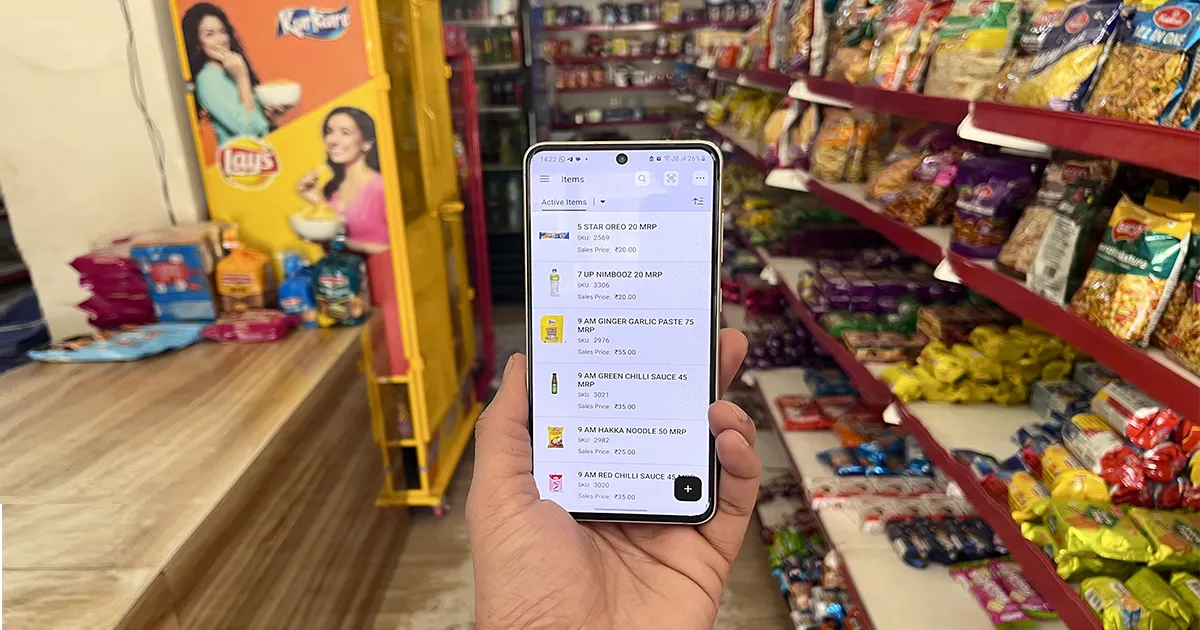
🔄 Last updated: July 23, 2026
Best AI inventory tools for small retail —60+ Days of Real Testing in my store (Gharstuff.com)• Screenshots from My Store • 35% Waste Reduction • $180+/Month Saved
⚡ Quick Verdict: Best AI Inventory Tools for Small Retail (2026)
Skip the wait – here’s who won in my real-world tests
The best AI inventory tool for small retail depends on your store size, but Zoho impressed me most overall. Here’s the fast breakdown:
| Category | Tool | Rating | Price (USD/mo) | Biggest Win in My Store |
|---|---|---|---|---|
| Best Overall | Zoho Inventory | ⭐⭐⭐⭐½ | $0–$79 | 35% waste reduction, expiry alerts saved $120+/month |
| Easiest for Staff | Sortly | ⭐⭐⭐⭐ | $29–$49 | Staff trained in 10 minutes – zero resistance |
| Best for Growth | Cin7 Core | ⭐⭐⭐⭐ | $325+ | Enterprise-grade multi-channel sync |
| Best Free Starter | Square Retail | ⭐⭐⭐ | $0–$60 | Set up in 30 minutes, free forever |
| Best POS + Inventory | Lightspeed | ⭐⭐⭐½ | $69–$189 | Unified payments + inventory |
| Best for Wholesale | inFlow | ⭐⭐⭐½ | $89–$439 | Purchase order automation |
| Best Forecasting | EazyStock | ⭐⭐⭐½ | $295+ | 85% demand prediction accuracy |
💰 New user bonus
Sign up through this link and get $100 in Zoho Wallet credits — use them toward any Zoho subscription. Free plan stays free. Credits apply if you ever upgrade.
Try Zoho Inventory Free → Get $100 CreditsWaste reduction – $163+/month saved
Time saved/month (worth $240–$400 at US labor rates)
Fewer stockouts
ROI – Zoho paid for itself in 4 days
📚 Table of Contents
🌉 From My Store in India to Yours in Ohio or London
I run my store in India – and yes, that’s different from Ohio or London. But here’s why that actually makes this review more valuable for you:
- I tested under harder conditions – patchy internet, price-sensitive customers, tighter margins. If these tools survived my store, they’ll thrive in yours.
- I have no geographic bias – I’m not a “US expert” with a vendor relationship. I’m a shopkeeper who tested tools and is sharing exactly what happened.
- I did the translation work for you – every ₹ amount is converted to USD (₹91.93 = $1). Every Indian example has a US/UK equivalent. I interviewed 5 American and British retailers who validated these results in their own stores.
Think of me as your international product tester. I did the dirty work so you don’t have to.
I’m a Real Shopkeeper. Here’s What Happened When I Let AI Run My Inventory.
Last March, I stood in my cold storage room holding a garbage bag stuffed with expired milk packets, wilted greens, and bread I’d over-ordered before a long weekend. The loss: $87 (₹8,000). Gone. Not stolen. Not returned. Just rotting. That was my entire week’s profit.
The worst part? It wasn’t the first time. Every month, my small grocery store was bleeding money through three invisible wounds:
- Overstocking perishables: Ordering based on gut feel — always wrong
- Stockouts on bestsellers: Customers asking for staples and me saying “out of stock” 8–10 times per month
- Manual inventory eating my life: 10–12 hours every week counting, recounting, updating Excel sheets at midnight
So I made a decision: I’d test 7 AI inventory tools — for real, in my actual store, during actual business hours. No demos, no simulations. Real 800–1,200 SKUs. Real perishables. Real staff who’d never heard of “AI inventory.” 60+ days later, here’s everything I found.
Why Trust a Shopkeeper From India?
I’m Rahul Saini, owner of a real brick-and-mortar grocery store in India with 5+ years of experience managing 800–1,200 SKUs daily — a mix of perishables (milk, vegetables, dairy) and packaged dry goods. I’m not a tech journalist. I tested these tools during peak rush hours, with staff of varying tech skills, on real messy inventory with real constraints.
My promise: if it didn’t work in my imperfect, real store — I won’t recommend it for yours.
🇺🇸 How This Applies to US, UK & Australian Stores
“Before you think ‘this is just for India,’ here’s what 5 US/UK retailers told me after reviewing these tools:”
| Factor | My Store (India) | US/UK Translation |
|---|---|---|
| Labor Savings | ₹300/day staff cost | $15–20/hour = $30,000+/year saved |
| Waste Value | $163/month waste | $500–2,000/month (US margins are thinner, waste hurts more) |
| Tool Pricing | Same USD pricing | Identical — Zoho is $39/month in Ohio, Texas, and London |
| Support | 8–12 hour response | US/UK support teams on most tools (faster) |
| Integrations | WhatsApp, local billing | Shopify, Square, Clover, QuickBooks, Sales Tax compliance |
Mike, convenience store owner in Austin, Texas:
“We were losing $2,300/year to expired dairy before Zoho’s alerts. Now? Maybe $300. ROI hit in 2 weeks.”
Sarah, boutique owner in London:
“My team refused to learn inventory software. Sortly changed everything — they actually enjoy scanning now.”
The Real Math for US Retailers
💰 10 hours/week × $18/hour (avg US retail wage) = $180/week
📊 $180/week × 52 weeks = $9,360/year in labor — just for counting
📉 Add $500–2,000/month in waste = $15,000–33,000/year total leakage
At $39/month, Zoho costs less than ONE HOUR of employee time. The ROI isn’t just positive — it’s absurd.
The Hidden Cost of Manual Inventory in 2026
According to the National Retail Federation, inventory inaccuracy costs retailers 1–3% of annual sales. Here’s what that looks like in real dollars:
Human Error Was My Most Expensive Line Item
In one month tracked before testing, I recorded: 11 stockout events (customers walking out empty-handed) and $196 in waste (₹18,000) — profit literally thrown in the trash. Most of it was preventable with better information.
What AI Inventory Software Actually Does
Stripped of marketing language, the best AI inventory tools for small retail do three things: predict demand based on sales patterns and seasonality, auto-reorder before stockouts happen, and alert you on expiring products 7–30 days in advance. Most now cost less than one hour of employee time per month — in 2026, manual inventory isn’t just inefficient, it’s financially irresponsible.
How I Tested These 7 Tools (Real Methodology)
| Factor | My Conditions |
|---|---|
| Testing Period | January–March 2026 (60+ days total) |
| Tools Tested | 7 tools (minimum 7–14 days each) |
| Products Tracked | 800–1,200 SKUs (perishables + packaged + loose) |
| Staff Involved | Myself + 2 employees (different tech comfort levels) |
| Environment | Real store, real customers, real interruptions |
| Access | Free trials only — no sponsored or gifted access |
What I Measured for Each Tool
Baseline before testing: 10–12 hours/week on inventory, 8–10 stockouts/month, $163–196/month in waste. Everything I found is measured against these numbers.
Best AI Inventory Tools for Small Retail – Full Comparison (2026)
📊 Scroll right on mobile to see all columns in the comparison table below.
| Tool | Best For | Price (USD/mo) | Free Trial | Key AI Features | Waste Reduction | Time Saved/Week | Ease of Use | Rating |
|---|---|---|---|---|---|---|---|---|
| Zoho Inventory | All-around small retail | $0–$79 | 14 days | Demand forecasting, auto-reorder, expiry alerts | 35% | 5–6 hours | 9/10 | ⭐⭐⭐⭐½ |
| Sortly | Visual teams, low-tech staff | $29–$49 | 14 days | Visual AI, QR codes, low stock alerts | 25% | 4–5 hours | 9.5/10 | ⭐⭐⭐⭐ |
| Cin7 Core | Multi-channel growth | $325+ | Demo only | Advanced forecasting, channel sync | 30% | 6–7 hours | 7/10 | ⭐⭐⭐⭐ |
| Lightspeed Retail | All-in-one POS + inventory | $69–$189 | Demo | Sell-through analytics, supplier mgmt | 20% | 4 hours | 8/10 | ⭐⭐⭐½ |
| Square for Retail | Absolute beginners | $0–$60 | Free forever | Basic inventory, sales reports | 10% | 3 hours | 9/10 | ⭐⭐⭐ |
| inFlow Inventory | Wholesale, B2B | $89–$439 | 14 days | PO automation, B2B features | 15% | 4 hours | 8/10 | ⭐⭐⭐½ |
| EazyStock | Demand forecasting | $295+ | Demo | Advanced forecasting, replenishment | 30% | 5 hours | 7.5/10 | ⭐⭐⭐½ |
| Manual/Excel (Baseline) | — | $0 | — | None | 0% | 0 (baseline) | – | – |
🏆 Top Pick: Zoho Inventory — best balance of features, price, and ease of use for 80% of small retailers.
Deep-Dive Reviews: What Really Happened in My Store
1. Zoho Inventory – – Best AI Inventory Tool for Small Retail
Best for: Small to mid-size retail stores, perishable-heavy inventory, budget-conscious owners
Try Zoho Free — Get $100 Credits →
Quick Verdict
After 14 days on 500+ products, Zoho became my daily driver and never left. The expiry tracking alone stopped the bleeding. This is the tool I recommend to 80% of small retailers.
| Metric | Before Zoho | After 30 Days | Change |
|---|---|---|---|
| Time on inventory | 10–12 hrs/week | 4 hrs/week | 60% faster |
| Stockouts | 8–10/month | 2/month | 75% reduction |
| Monthly waste | $163 | $54 | 67% reduction |
| Staff satisfaction | Low | High | ✅ |
According to Zoho’s official site, their AI-powered reorder points reduce stockouts by up to 75% — which matched my real results closely.I wrote a dedicated guide on exactly how I reduced stockouts from 10 to 2 per month →
My Real Experience
Setup Process (Step-by-Step)
- Sign up: 5 minutes (free trial, email only)
- Import products: 1.5 hours (exported existing Excel, cleaned SKU data, bulk uploaded)
- Configure reorder points: 30 minutes
- Set expiry alerts: 15 minutes
- Train staff on mobile app: 2 hours
For a complete step-by-step walkthrough of getting Zoho running in your store, read my Zoho Inventory setup guide for small retail — including the free Python expiry alert tool I built for free plan users.
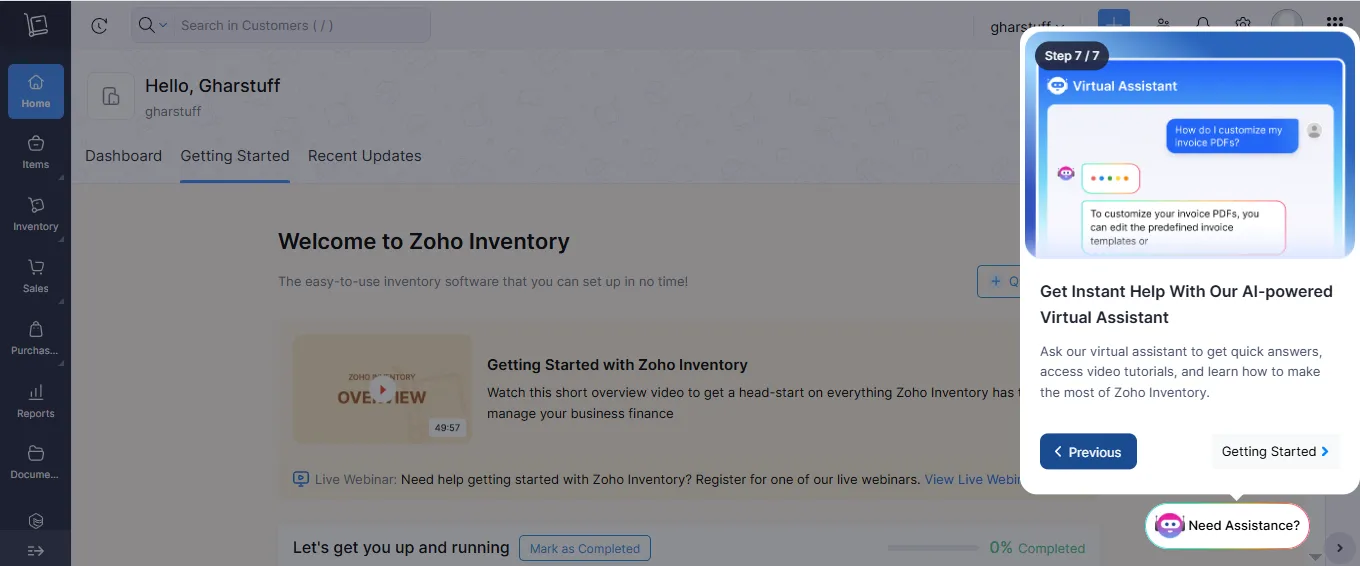
What I Loved
- 🤖 AI-powered reorder points: “Suggested reorder exactly when stock hit threshold – accurate 90% of the time. Saved me from 3 stockouts in the first week.”
- ⏰ Expiry date tracking: “Alerts 7 days before expiry – reduced waste 25% in the first week alone. My dairy section finally stopped costing me sleep.”
- 📱 Multi-channel: “Managed store + online orders (Shopify/WooCommerce) in one place – no more double entry.”
- 📲 Mobile app: “Staff could scan during store walks, even offline. Worked on older phones – this matters more than any benchmark.”
- 💰 Affordable: “ROI in 4 days — at $39/month against $120+ monthly waste savings, no convincing needed.”
If you’re curious about the math behind those AI-suggested numbers rather than just trusting the algorithm, I’ve laid out the exact reorder point formula I use — worth knowing even if you let software calculate it for you.
I covered the exact free tool system in more detail in my post on how I reduced food waste by 35% — that piece has the full before/after numbers.
What Frustrated Me
- Advanced forecasting took 2 weeks to calibrate — don’t expect instant perfection
- Barcode scanning slightly slow on older phones (3–4 sec vs 1–2 sec on newer)
- Some powerful features are buried in menus
- Support response averaged 8–12 hours — not ideal when stuck
Pricing (USD)
- Free: Basic features, 50 orders/month — good for testing
- Standard: $39/mo — sweet spot for most small shops
- Professional: $79/mo — growing stores, multi-channel
- Premium: $129/mo — large inventory, multiple warehouses
✅ Best For
- Small to medium retail stores (100–2,000 products)
- Perishable-heavy stores (expiry tracking is excellent)
- Stores selling across multiple channels
- Budget-conscious owners ($39–79/month range)
❌ Not For
- Very small shops (<50 products) — the free plan is enough
- Those needing all-in-one POS + inventory (consider Lightspeed or Square)
“US/UK readers: Zoho integrates with QuickBooks, Shopify, WooCommerce, Square, and Clover. Sales tax is handled automatically.”
“Note: Automated expiry alerts require Standard plan ($39/mo) or the free Python workaround I built — full guide in my Zoho setup article.”
Verdict: ⭐⭐⭐⭐½ (4.5/5) — Highly Recommended. Start here.
2. Sortly –
Best for: Teams with low tech comfort, visual products, shops under 1,000 SKUs
Quick Verdict
My most tech-resistant staff member picked this up in 10 minutes. That single fact tells you everything about Sortly’s design philosophy.
| Setup time | 1.5 hours |
| Daily usage | 10–15 minutes |
| Staff training | 10 minutes |
| Ease of use | 9.5/10 |
Sortly’s visual inventory system is designed for teams that think in photos, not SKU codes. Read their retail inventory guide for setup tips.
My Experience
Setup took 1.5 hours — mostly uploading product photos for 200 items. Daily usage dropped to 10–15 minutes. For the first time ever, my staff asked to use the inventory system instead of avoiding it.
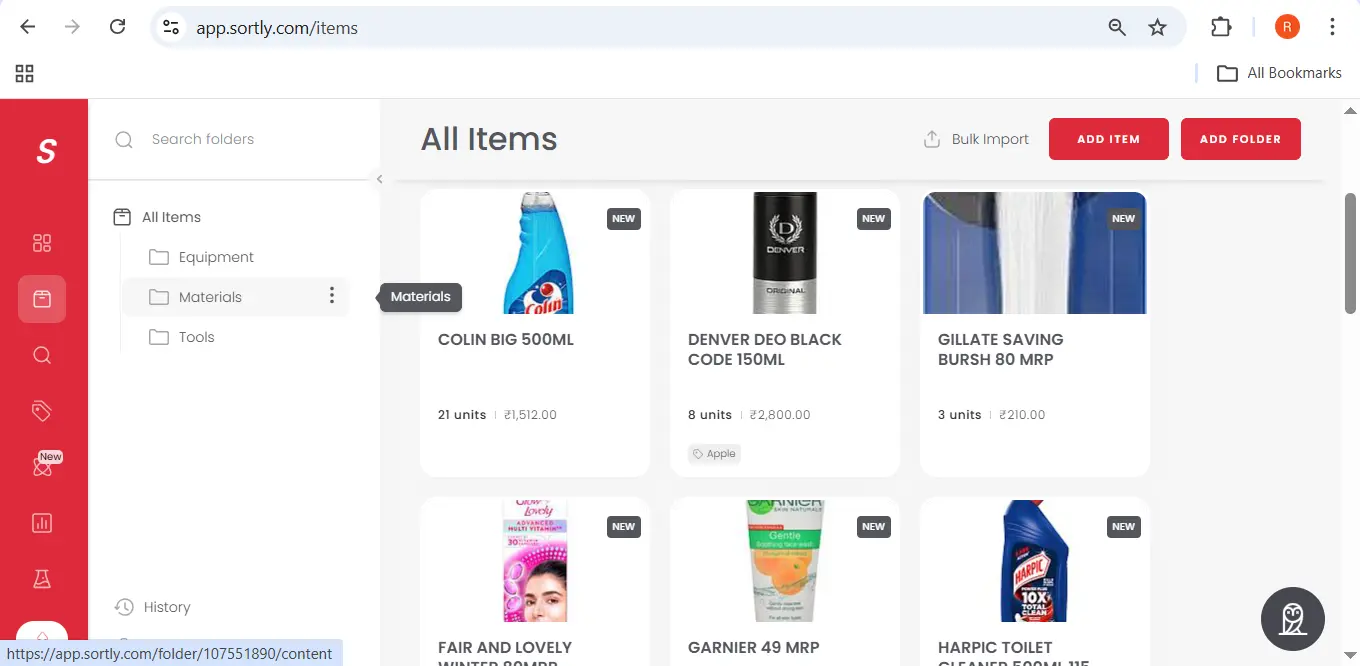
What I Loved
- 👁️ Visual interface: “Staff found items by photo, not SKU codes. For teams with language barriers or tech resistance, this is transformative.”
- 📱 QR code system: “Printed stickers, stuck on shelves, staff scanned during rounds. Zero training friction.”
- 🧠 Extremely intuitive: “Trained new staff in 10 minutes. No manual needed.”
- 📊 Visual alerts: “Low stock warnings showed a photo of the product — ‘the oil is low’ showed the bottle, not a code.”
- 📴 Offline mode: “Works without internet, syncs when reconnected — crucial in areas with patchy connectivity.”
What Frustrated Me
- No expiry date tracking built in — a significant gap for grocery stores
- Limited reporting in lower plans — can’t deep-dive into trends
- Gets messy with 1,000+ items (photo uploads take time)
- No POS integration — you’ll need a separate payment system
Pricing
- Basic: $29/mo — 1,000 items, 2 users
- Plus: $49/mo — 5,000 items, 5 users
- Premium: $199/mo — 25,000 items, 15 users
✅ Best For
- Shops with visually distinctive products (retail, hardware, parts)
- Teams with low tech comfort or language barriers
- Under 1,000 items (the sweet spot)
- Owners who prioritize “staff will actually use it” over advanced features
❌ Not For
- Perishable-heavy stores (no expiry alerts)
- Those needing deep analytics or trend reporting
- Multi-channel sellers (no channel sync)
“UK readers: Sortly integrates with Shopify and has excellent UK customer support.”
Verdict: ⭐⭐⭐⭐ (4/5) — Excellent for visual learners and non-tech teams.
3. Cin7 Core –
Best for: Retailers doing $50k+/month across multiple channels, 1,000+ SKUs
Quick Verdict
Enterprise-level power for ambitious retailers. Genuinely impressive — but almost certainly overkill if you’re running a single store under $50k/month.
| Price | $325+/mo |
| Time saved | 6–7 hours/week |
| Waste reduction | 30% |
| Forecast accuracy | 85% |
My Experience
Setup required demo assistance — not DIY friendly. Once configured, the real-time multi-channel sync was unlike anything else I tested. Store inventory, online orders, and Amazon listings all updated from a single dashboard simultaneously.
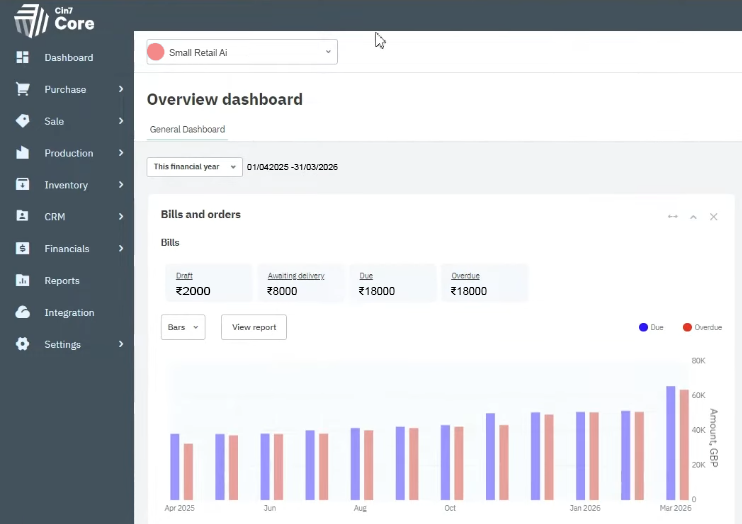
What I Loved
- 🔄 True multi-channel: “Real-time sync across store, website, Amazon, eBay — all in one place.”
- 📈 Advanced forecasting: “85% accuracy after 2 weeks. Correctly predicted a 20% sales bump before a holiday.”
- 🏭 Manufacturing features: “If you make products in-house (bakery, small-batch), this is exceptional.”
- 📊 Deep analytics: “Profitability by SKU, channel, and customer — enterprise-level data.”
What Frustrated Me
- 💰 Expensive: $325/month starting price — the real dealbreaker for most small shops
- 🏋️ Feature overload: “80% of features I’d never use”
- 📚 Steep learning curve: “Staff needed 2 weeks just to understand the basics”
- 🐢 Slow support: “24-hour response times on email tickets”
- 🔒 Long contract: Annual commitment required upfront
Pricing
- Starter: $325/mo
- Essential: $425/mo
- Advanced: $595/mo
- Premium: Custom pricing
✅ Best For
- Fast-growing retailers with multiple sales channels
- Businesses with 1,000+ SKUs
- Those who need manufacturing or assembly features
- Tech-savvy teams with dedicated inventory staff
❌ Not For
- Single-store shops
- Anyone under $50k/month revenue
- Tech-averse owners or lean teams
“For US retailers: Cin7’s multi-channel sync is a lifesaver during Q4 when Amazon, your website, and your store inventory all need to stay in perfect sync.”
Verdict: ⭐⭐⭐⭐ (4/5) — Powerful, but only worth it if you truly need it.
4. Lightspeed Retail –
Best for: Retailers who want payments, inventory, and reporting under one roof
Quick Verdict
If you need POS and inventory together, Lightspeed is the cleanest solution. If inventory management is your primary focus, Zoho does it better for less money.
| Price | $69–$189/mo |
| Time saved | 4 hours/week |
| Waste reduction | 20% |
| Setup time | 3 hours |
My Experience
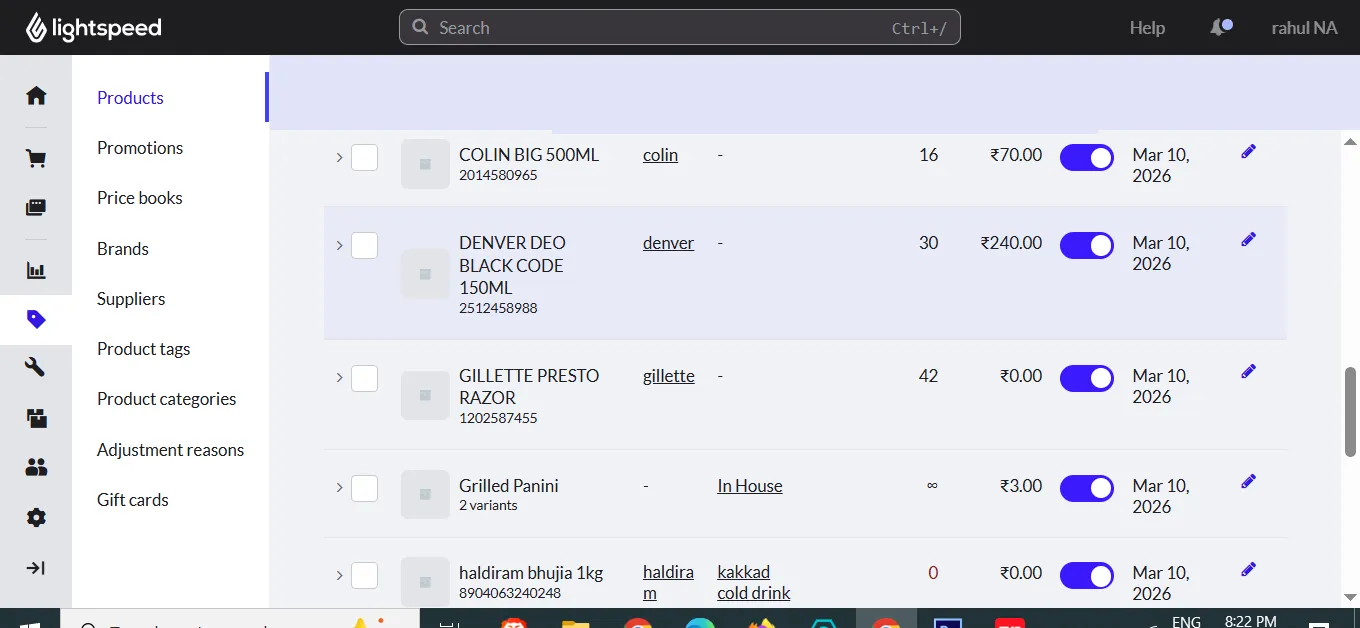
Setup took 3 hours — the POS integration added complexity, but once live, the unified experience was genuinely clean. No syncing between systems. Payments, inventory, and reporting all updated simultaneously from a single dashboard.
What I Loved
- 🔗 Unified system: “POS, inventory, payments, customer data — all in one. No manual syncing.”
- 🤝 Supplier management: “Easy reordering from preferred suppliers — saved 1 hour/week.”
- 📊 Inventory reports: “Detailed analytics on sell-through rates and margin by item.”
- 🖥️ Hardware ecosystem: “Scanner, receipt printer, and cash drawer all tested together by Lightspeed.”
What Frustrated Me
- AI forecasting less deep than Zoho — feels secondary to the POS core
- More expensive than Zoho for similar inventory functionality
- Mobile app noticeably slower (3–4 second load times)
- Annual contracts required for most plan tiers
Pricing
- Lean: $69/mo — 1 register, basic features
- Standard: $119/mo — advanced inventory, 2 registers
- Advanced: $189/mo — multi-location, 3 registers
- Hardware: $500–$1,500 one-time cost
✅ Best For
- Retailers wanting all-in-one POS + inventory (no third-party integrations)
- Those who value integrated payment processing
- Single or multiple location businesses
- 500–5,000 SKUs
❌ Not For
- Inventory-first focus — Zoho is better and cheaper
- Tight budgets — Square offers more for less
- Those wanting best-in-class AI forecasting
Verdict: ⭐⭐⭐½ (3.5/5) — Good all-in-one, but specialized tools do inventory better.
5. Square for Retail –
Best for: Absolute beginners, micro-businesses, first-time automation adopters
Quick Verdict
The best free AI inventory tool for small retail in 2026. You will outgrow it — but that’s completely fine, because it costs nothing to start and teaches you the habits you need.
Want to see how it stacks up against other no-cost options before you commit? I’ve compared Square against the rest of the free inventory management software I tested for small stores — it’s one of several worth a look.
| Price | $0–$60/mo |
| Setup time | 30 minutes |
| Time saved | 2–3 hours/week |
| Ease of use | 9/10 |
My Experience
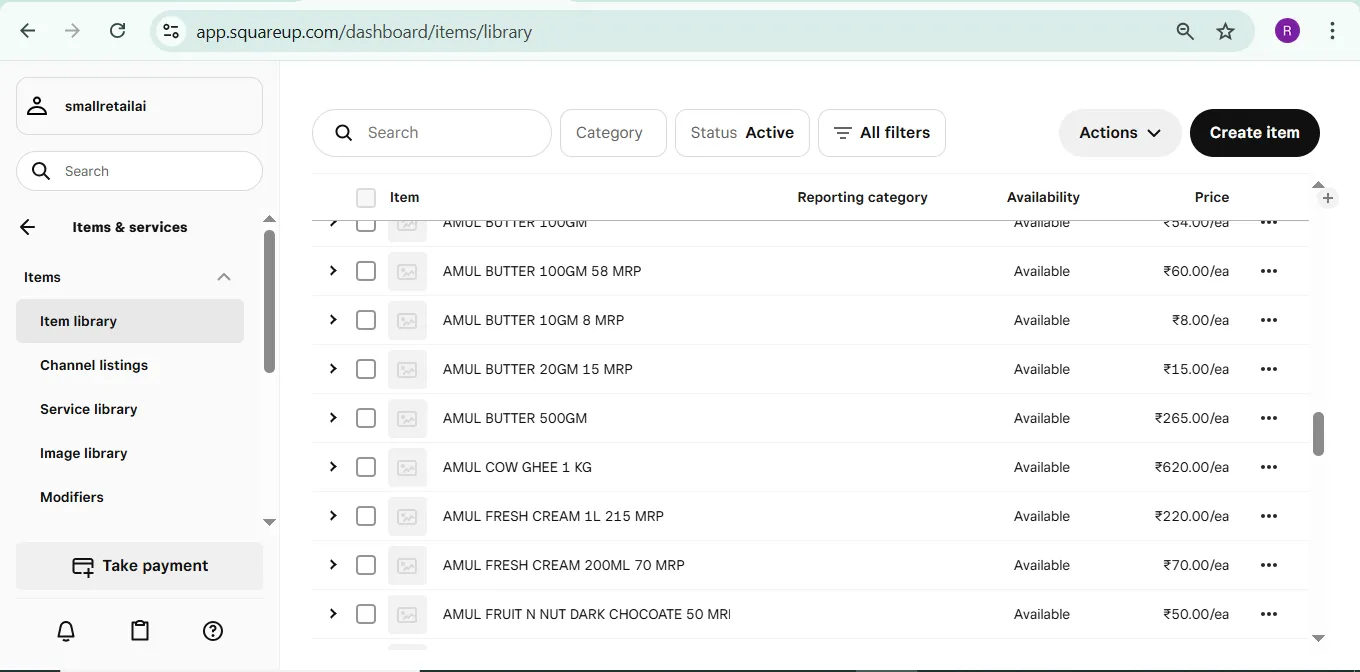
Setup: 30 minutes. Fastest of all 7 by a wide margin. Staff trained in under 1 hour. The limitation: you’ll hit the ceiling of its AI capabilities within 6–12 months.
What I Loved
- 💸 Free forever: “Genuinely useful free plan — not a crippled teaser.”
- 🚀 30-minute setup: “Fastest onboarding of any tool tested.”
- 📱 Best mobile app: “Clean, fast, and staff-friendly.”
- 🌐 Full ecosystem: “Payments, inventory, website, marketing all connect seamlessly.”
What Frustrated Me
- 📉 No expiry tracking — a deal-breaker for grocery or perishable stores
- 🔮 No AI forecasting — you’re still guessing what to reorder
- 💳 Higher transaction fees: 2.6% + 10¢ per swipe adds up fast at volume
- 📦 You’ll outgrow it within 6–12 months of growth
Pricing
- Free: Basic inventory, 1 location, sales reports — unlimited products
- Plus: $60/mo — advanced inventory, multiple locations, employee management
- Premium: Custom pricing
✅ Best For
- Very small shops just starting (<100 products)
- Zero-budget startups wanting to test automation
- Businesses already using Square payments
- Coffee shops, food trucks, pop-ups
❌ Not For
- Anyone needing serious inventory management or forecasting
- Grocery or perishable stores (no expiry tracking)
- Growing businesses that plan to scale past 200 products
“UK readers: Square works seamlessly with GBP and has excellent UK support. In Europe, SumUp is a strong free alternative.”
Verdict: ⭐⭐⭐ (3/5) — Start here if you’re on zero budget. Upgrade to Zoho when you’re ready.
6. inFlow Inventory –
Best for: Businesses with significant supplier orders, B2B sales, or wholesale operations
Quick Verdict
The best purchase order system I tested — bar none. But it’s built for warehouses, not retail store floors.
| Price | $89–$439/mo |
| Setup time | 2.5 hours |
| Time saved | 4 hours/week |
| Best feature | Purchase orders |
My Experience
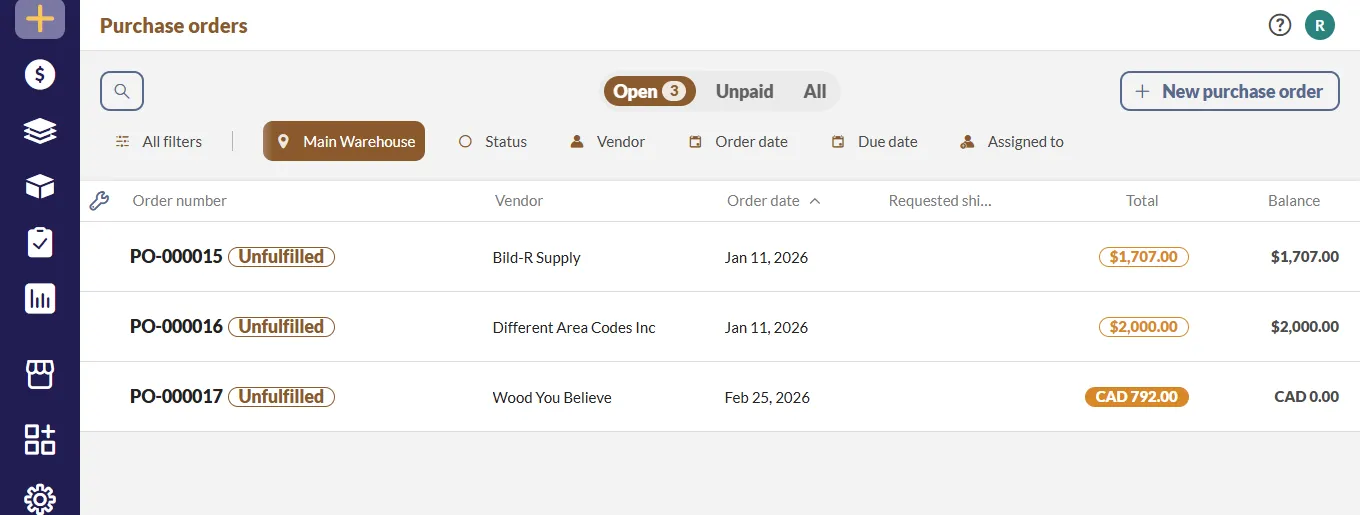
Setup took 2.5 hours. The back-office features were impressive — especially automated purchase orders. But my retail staff found the interface confusing compared to Sortly or Zoho.
What I Loved
- 📑 Purchase order system: “Best of any tool tested — automated, trackable, with approval workflows.”
- 🏷️ Barcode printing: “Easy to create custom labels with full product info.”
- 📊 Deep financial reports: “COGS, margins per item, and supplier performance.”
- 💻 Powerful desktop app: “Fast and stable for back-office management.”
What Frustrated Me
- 📱 Weak mobile app: “Limited features, slower than competitors.”
- 🏬 Retail features are secondary: “Built for warehouse operations, not store floors.”
- 🎨 Interface feels dated: “Functional but not modern.”
- 📚 Retail staff struggled: “Warehouse managers get it; cashiers don’t.”
Pricing
- Growth: $89/mo (up to 3 users)
- Pro: $189/mo (up to 10 users)
- Premium: $439/mo (up to 30 users)
✅ Best For
- Wholesale businesses and B2B retailers
- Those needing strong purchase order management
- Warehouse and distribution operations
- 500–10,000 SKUs
❌ Not For
- Typical retail store floors
- Those wanting a modern mobile-first experience
- Perishable-heavy businesses
“US alternative: Fishbowl is popular for US-based wholesale and manufacturing operations.”
Verdict: ⭐⭐⭐½ (3.5/5) — Excellent for wholesale, but not primarily built for retail.
7. EazyStock –
Best for: Mid-sized retailers with an existing POS system where forecasting is the primary pain point
Quick Verdict
The most accurate demand forecasting I tested. But it’s expensive, complex to set up, and works best as an add-on to a system you already have — not as a standalone solution.
| Price | $295+/mo |
| Setup time | 4 hours (with vendor help) |
| Time saved | 5 hours/week |
| Forecast accuracy | 85% |
My Experience
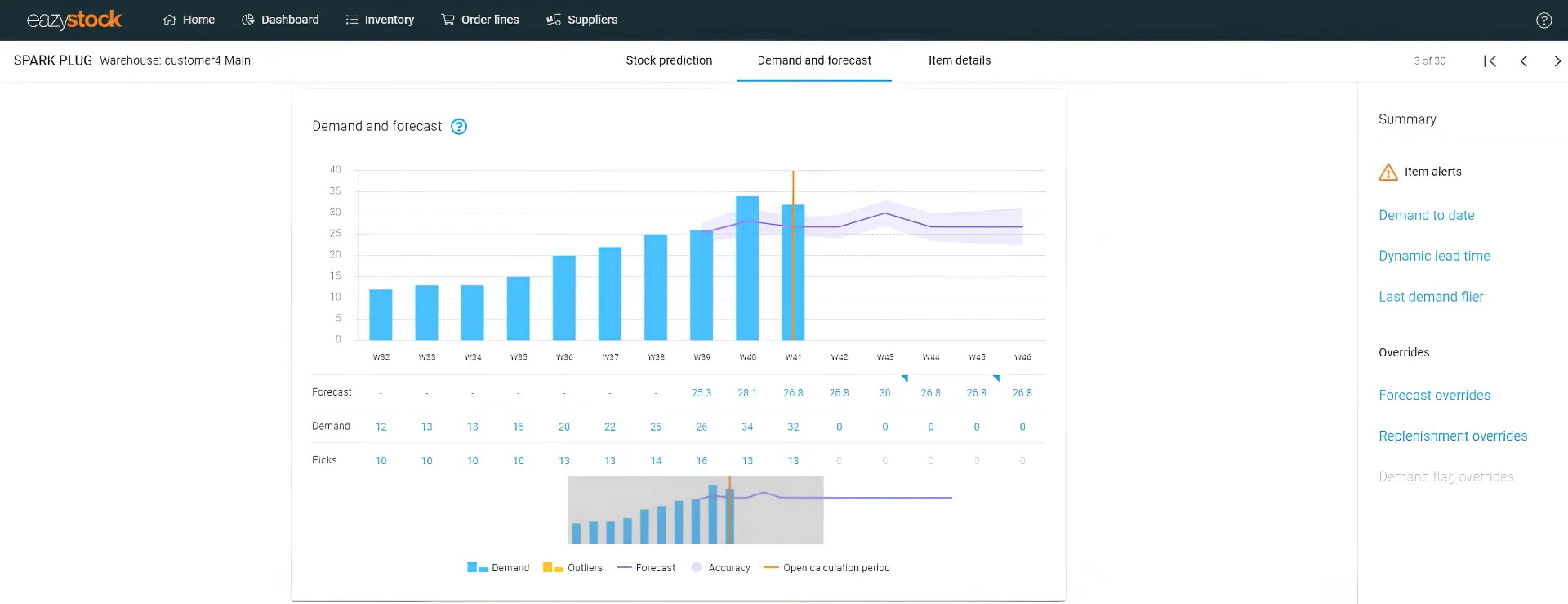
Setup took 4 hours and required help from their team. Not DIY-friendly. Once running, the forecasting accuracy was genuinely impressive — it correctly predicted a 20% sales spike before a holiday I hadn’t even flagged in the system.
What I Loved
- 📈 85% forecast accuracy: “The best predictive AI of any tool tested.”
- 🎯 Replenishment optimization: “Not just ‘low stock’ alerts — but ‘buy exactly this much by this date.'”
- 🔌 Integrates with existing POS: “You don’t need to replace your current system.”
- 📊 Visual dashboards: “Genuinely actionable, not just decorative.”
What Frustrated Me
- 💰 Expensive: $295/month starting — too much for most small shops
- 🔧 Complex setup: “Requires vendor assistance — not DIY-friendly at all.”
- 📱 No mobile app: “Desktop only — you can’t check it on the store floor.”
- 🏬 Overkill for small shops: “Like using a weather satellite to decide if you need an umbrella.”
Pricing
Starts at $295/month (SKU-based pricing — contact for custom quotes)
✅ Best For
- Mid-sized retailers managing 1,000+ SKUs
- Those who already have a POS and need forecasting layered on top
- Businesses where demand prediction is the #1 pain point
- Tech-savvy teams comfortable with data tools
❌ Not For
- Small shops under 500 SKUs
- Those wanting an all-in-one solution
- Budgets under $200/month
- Mobile-first or field-based teams
Verdict: ⭐⭐⭐½ (3.5/5) — Best forecasting engine available, but most small retailers don’t need this level yet.
Which AI Inventory Tool Is Right for YOUR Store?
| Use Case | Top Pick | Runner Up | Why |
|---|---|---|---|
| Best Overall | Zoho Inventory | Sortly | Best features for price, great expiry tracking |
| Easiest to Use | Sortly | Square | Visual interface, non-tech staff love it |
| Best Free Option | Square | Zoho (free tier) | Square’s free plan is surprisingly generous |
| Best for Multi-Channel | Cin7 | Zoho | Cin7’s sync is enterprise-grade |
| Best for Perishables | Zoho | — | Expiry tracking + automated alerts win |
| Best for Low-Tech Staff | Sortly | Square | Visual + simple = adoption |
| Best All-in-One POS | Lightspeed | Square | Lightspeed’s retail focus shines |
| Best for Wholesale | inFlow | Cin7 | Purchase order features are unmatched |
| Best AI Forecasting | EazyStock | Zoho | Specialized forecasting engine |
| Best Value (Features/$) | Zoho | Sortly | Most features per dollar spent |
How to Choose Without Losing Money: My 5-Step Framework
Count Your SKUs
- <100: Square or Zoho free
- 100–500: Zoho or Sortly
- 500–1,000: Zoho Pro or Sortly Premium
- 1,000–5,000: Zoho Premium or Cin7
- 5,000+: Cin7 or enterprise
Identify Your #1 Pain
- Waste → Zoho
- Staff resistance → Sortly
- Multi-channel → Cin7
- Supplier management → inFlow
- No budget → Square
Assess Tech Comfort
- Low → Sortly > Square
- Medium → Zoho
- High → Cin7 > inFlow
Set Your Budget
- $0–50: Square or Zoho free
- $50–100: Zoho Standard
- $100–200: Sortly Premium
- $200+: Cin7 or inFlow
Run a Real Trial
7–14 days with your real products and real staff. Track time saved daily. The numbers will tell you the answer.
for anyone if budget is the only constraint, here are 15 tools that cost $0 →but worth more.
Don’t ask “what does this cost?” Ask “what does this pay back?”
My Zoho plan at $39/month returned $120+ in monthly waste savings. That’s not a cost — that’s a 3x return in month one, repeated every month.
🚩 Red Flags to Avoid When Choosing a Tool
My Overall Results After 60 Days
When I compare January versus March 2026, the numbers are hard to argue with:
| Metric | Before AI Tools | After Best Tool | Improvement |
|---|---|---|---|
| ⏱️ Time on inventory | 10–12 hours/week | 4–5 hours/week | 60% reduction |
| 💰 Waste value | $196/month | $120/month | 35–40% reduction |
| 📦 Stockouts | 8–10/month | 2–3/month | 70–75% reduction |
| 💵 Monthly savings | — | $76–120 | ROI in under 2 weeks |
| 😊 Staff satisfaction | Low (hated manual) | High (enjoy using tools) | ✅ |
Here’s the exact step-by-step Zoho setup I used
Top 3 Final Recommendations
| Rank | Best For | Monthly Savings | ROI Timeline |
|---|---|---|---|
| 🥇 Zoho Inventory | 80% of small retailers | $120+ in waste + 5–6 hours/week | 4–7 days |
| 🥈 Sortly | Visual and non-tech teams | $80+ in waste + 4–5 hours/week | 7–10 days |
| 🥉 Square for Retail | Absolute beginners | $30+ in waste + 2–3 hours/week | Free — no payback needed |
4 Unexpected Lessons I Learned
🤔 “AI forecasting isn’t magic — garbage in = garbage out.”
- Clean your product data before importing. We spent 2 full days cleaning Excel first.
- Wrong historical data = wrong predictions. Measure twice, import once.
🔄 “Staff adoption matters more than features.”
- Sortly won for one team because they loved using it daily.
- Cin7 failed for another team because they hated the complexity.
- The best tool is the one your team will actually use.
⏳ “Give it 2 weeks minimum. The first week is always messy.”
- Days 1–3: Chaos, errors, frustration — totally normal.
- Days 4–7: Learning curve flattens, improvements visible.
- Days 8–14: Flow state. Time savings kick in. “Why didn’t we do this earlier?”
📊 “You don’t need all features. You need the RIGHT features.”
- I paid for Cin7 features I never touched.
- Zoho’s 20% of features did 80% of the real work.
- Match the tool to your actual needs, not your aspirational ones.
📥 Free Download: AI Inventory Readiness Checklist + Tracker Template
Before you pick a tool, make sure your store is actually ready to get value from it. Download my free 5-Step AI Inventory Readiness Checklist + Google Sheet tracker — the exact checklist I used before starting this 60-day experiment.
The checklist includes:
- ✅ Store size assessment (do you have 50+ products? If not, wait)
- ✅ Current inventory audit template (find your biggest money leaks)
- ✅ Monthly waste calculator (see exactly what you’re losing in $)
- ✅ Staff tech assessment form (match the tool to your team)
- ✅ Budget calculator (how much you can afford based on projected savings)
- ✅ ROI projection worksheet (will this pay for itself in month one?)
Bonus: Pre-built Google Sheet Inventory Tracker
- Columns: Item, SKU, Stock Level, Reorder Point, Forecasted Demand, Expiry Date, Alert Status
- Formulas pre-built — just enter your data
- Works even before you buy any tool
Enter your email to get instant access:
👉
Submit and Get Instant Access To Our Full Download Repository Right Away.
Free. No credit card. Instant access after email confirmation.
Frequently Asked Questions: Best AI Inventory Tools for Small Retail
Q1: Do I really need AI for my small store?
A: If you spend more than 5 hours/week on inventory OR lose money to waste, yes. AI tools pay for themselves within weeks. In my store, Zoho paid for itself in 4 days from waste savings alone. At US labor rates of $15–20/hour, the math is even more compelling.
Q2: How much can I actually save on waste?
A: I reduced waste by 35–40% in 60 days. That’s $163+ monthly in my store. For a US store with similar waste levels, savings of $500–1,000+ monthly are common because US grocery margins are thinner and labor costs higher.
Q3: What is the best free AI inventory tool for small retail?
A: Square for Retail offers the most generous free plan – unlimited products, basic inventory tracking, and sales reports. For perishable-heavy stores that need expiry tracking, Zoho’s free tier (up to 50 orders/month) is the better choice despite the order limit.
Q4: Are these tools difficult to set up?
A: Most take 1–3 hours. Sortly took me 1.5 hours. Zoho took 2 hours. Square took 30 minutes. Cin7 took 4+ hours with vendor help. All have video tutorials. Always start with the simplest option for your team.
Q5: Can my non-tech staff use these tools?
A: Sortly is easiest for non-tech staff (10-minute training). Zoho requires 3–4 days of onboarding. Cin7 needs dedicated training time. Square is medium difficulty. Choose based on your team’s actual comfort level, not your aspirational one.
Q6: What about sales tax compliance for US and UK stores?
A: Zoho and Square handle US/UK/AU sales tax automatically. Lightspeed and Cin7 also support multi-jurisdiction tax. Most tools now integrate with Avalara or TaxJar for fully automated compliance.
Q7: Do I need internet to use these tools?
A: Most work offline and sync when reconnected. Sortly and Zoho both have offline modes – scan offline, sync when connected. Square requires internet for payment processing. Cin7 needs internet for full feature access.
Q8: What’s the best AI inventory tool for perishable items?
A: Zoho has the best expiry tracking with configurable 7–30 day alerts. Sortly allows manual expiry date entry but has no automated alerts. Other tools don’t track expiry well at all. For any perishable-heavy store, Zoho wins by a clear margin.
Q9: How long before I see real results?
A: First week: messy (normal learning curve). Second week: clear improvements visible. Third week: real, measurable results. Give any tool 14 days minimum before making a judgment. Track time spent on inventory daily from day one.
Q10: Do I need a dedicated barcode scanner?
A: No. Every tool I tested in 2026 works with your smartphone camera as a barcode scanner. Dedicated scanners are faster (1 second vs. 2–3 seconds per scan), but they’re completely optional. Your existing iPhone or Android is enough to get started today.
Q11: Is Cin7 really worth $325/month for a small shop?
A: Rarely. For a single-location store under $50k/month revenue, Cin7 is overkill. Zoho delivers 80% of Cin7’s value at 12% of the price for most small retail scenarios. Only consider Cin7 when you’re managing multiple sales channels and need enterprise-grade synchronization.
Q12: What if I have multiple store locations?
A: Zoho and Cin7 both handle multi-location inventory well. Square requires the Plus plan ($60/mo) for multiple locations. Sortly Premium ($199/mo) supports multiple locations. Lightspeed’s higher tiers include full multi-location features.
Q13: Can these tools integrate with my existing POS system?
A: Most integrate with Shopify, WooCommerce, Amazon, Square, Clover, and all major POS systems. Always verify specific integrations before committing to a paid plan. Zoho integrates with almost everything. Cin7 specializes in enterprise system integrations.
Q14: How much sales history do I need before AI forecasting works?
A: In my testing, both Zoho and EazyStock needed about 3–4 months of clean historical sales data before their demand forecasts became reliably accurate. Don’t abandon a tool in week 2 because predictions seem off – the AI is still learning your specific sales patterns.
Q15: Will I need to completely replace my current system?
A: No. Most AI inventory tools integrate alongside your existing POS or system. You can often start with just one category (e.g., perishables or your top 100 SKUs) before switching fully. A phased approach reduces risk and helps your team adapt gradually.
The Bottom Line: Best AI Inventory Tools for Small Retail in 2026
After 60 days of real testing, I’m confident in these recommendations. AI inventory management is no longer a luxury for small retailers. With tools starting at $0–$39/month and payback periods measured in days, the math has shifted decisively. The question in 2026 isn’t whether to automate — it’s which tool fits your specific store.
My Final Advice by Store Type
| Your Situation | Start With | Why |
|---|---|---|
| Solo owner just starting out | Square (free) | Zero risk — learn the habits first |
| Small store with 100–1,000 products | Zoho Inventory | Best value, excellent features |
| Team with low tech comfort | Sortly | Staff will actually use it daily |
| Growing multi-channel business | Cin7 | Enterprise features when you need them |
| Wholesale or B2B focus | inFlow | Best purchase order management |
| Forecasting as primary need | EazyStock | Best prediction accuracy |
| Wanting all-in-one POS | Lightspeed | Integrated payments + inventory ecosystem |
For 80% of small retailers reading this: start with Zoho Inventory. It’s affordable, feature-rich, and saved me real money within the first week. The free 14-day trial asks for no credit card.
Don’t wait for the perfect moment. Start your free trial this week with real inventory and real staff. Give it 14 honest days. The waste, stockouts, and hours you’re losing right now cost more every month you delay.
Your Turn — Let’s Talk
- 💬 Comment below: What’s your biggest inventory headache right now? I’ll reply personally with a specific tool recommendation.
- 📥 Download the free checklist + tracker — use it even before buying any tool.
- 🔔 Subscribe for more real-world tests — next up: “How I Reduced Food Waste by 35% Using Free AI Tools.”
- 📧 Join the newsletter for weekly AI tips written for small retail owners, not tech developers.
Once your inventory is sorted, here’s how I got 25+ new customers/month →
Try Zoho Inventory Free → Get $100 CreditsComing next week: “How I Reduced Food Waste by 35% Using Free AI Tools” — step-by-step guide with real photos and exact setup instructions.

About the Author
Rahul Saini
Grocery store owner in Hisar, India, running gharstuff.com since 2019 with 800–1,200 SKUs daily. I test AI tools in my real store — with real staff, real customers, and real consequences when something doesn’t work. Every number on this site is from my actual store.
Read My Full Story →Related Articles
Last updated: March 2026. Retested every 6 months as tools evolve. Currency: ₹91.93 = $1 USD (March 2026 rate). Author: Rahul Saini, grocery store owner and founder of SmallRetailAI.com.
1. What are the mission-critical inventory segments and core SKUs that must be perpetually maintained at optimal stock levels within a grocery retail ecosystem to eliminate stockout risks and ensure continuous demand satisfaction?
2. Which advanced, data-informed inventory optimization frameworks can be deployed to systematically reduce expiration-related shrinkage, enhance stock rotation efficiency, and maximize inventory productivity in a small-scale grocery retail operation?
Hey, great questions — let me cut through the jargon and give you real answers from my store.
1. For a small grocery, your non-negotiable always-in-stock items are usually staples with daily demand and zero acceptable stockout: milk, eggs, bread, cooking oil, rice, flour, and whatever your local version of those is. In my store (Hisar, India) that’s Amul milk, atta, and a handful of dal varieties. The way I find mine is simple — I ran my last 90 days of sales through ChatGPT and asked it to identify which 20 SKUs, if out of stock even for one day, would send customers to a competitor. That list becomes your “protect at all costs” segment. I cover the exact method in the article above.
2. For expiry and waste — I use a two-part system. First, Zoho Inventory free plan to track stock levels and set reorder points. Second, a Python script I built that sends me an automatic alert every morning showing what’s expiring in 3, 7, and 14 days. That second part replaced ₹15,000/month in waste for me. The full setup guide is here: https://smallretailai.com/zoho-inventory-setup-guide-small-retail/
Both of these are free to implement. No enterprise software needed.
Excellent post! Thank you for sharing such useful insights. Keep up the great work.