
🔄 Last updated: April 14, 2026
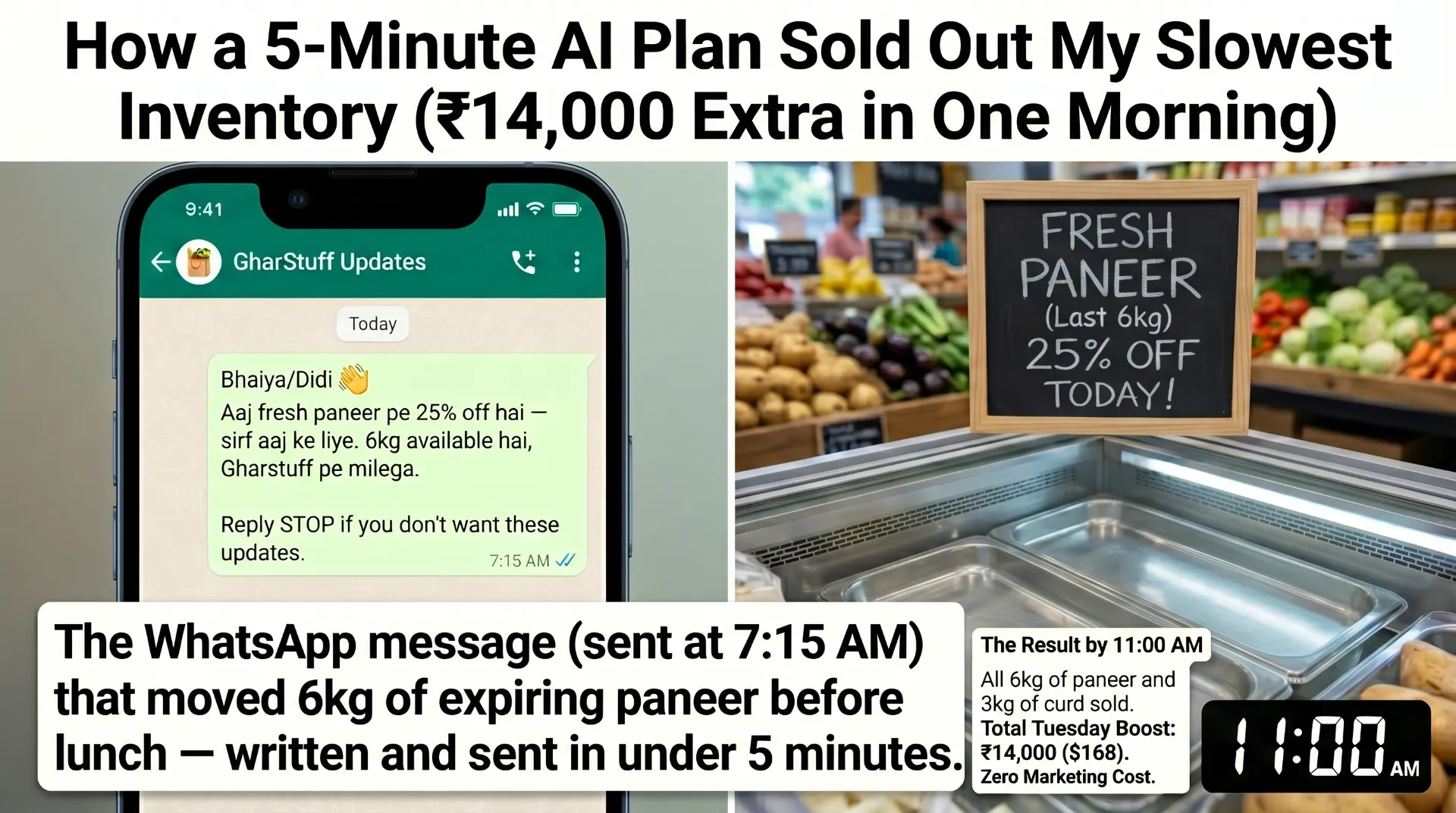
This is the exact AI WhatsApp marketing system for small grocery store I built after one Tuesday morning broadcast about near-expiry paneer made ₹14,000 in 4 hours — using ChatGPT, a phone, and zero marketing budget.
AI WhatsApp Marketing for Small Grocery Store — The 15-Minute System That Works
It was a Tuesday at 7:10am. I had 6kg of paneer sitting in the cold storage with 2 days left on the expiry date. Vishal had already spotted it — he came to me before the morning rush and said, in that way he has of stating problems without suggesting solutions: “Bhaiya, paneer.”
I opened ChatGPT on my phone. Typed one prompt. Got three message options. Picked the shortest one, changed “dear customer” to something that sounded like me, and sent it to my broadcast list at 7:15am. Then I went back to opening the shop.
By 11am, Vishal came back. “Bhaiya, phone won’t stop buzzing.” The paneer was gone. All 6kg. We’d also sold 3kg of fresh curd that people grabbed on the way out. Extra revenue that Tuesday: ₹14,000 ($168). From a ₹0 marketing spend and 5 minutes of effort.
📱 Want my exact WhatsApp messages?
Download all 5 broadcast templates + ChatGPT prompts (free).
That was the moment I stopped thinking of WhatsApp as “just telling people stuff” and started treating it as the only marketing channel a small grocery store actually needs.
I’ve been running this system every week since. In the last 4 months, average Tuesday revenue is up 28% compared to the 4 months before. I haven’t spent a rupee on ads. I also made 3 mistakes early on that I’ll tell you about, because two of them nearly got my WhatsApp number banned.
📚 What’s in this guide
Why WhatsApp and Not Instagram or Facebook Ads
I tried Facebook ads once. Spent ₹2,000 ($24) over 5 days. Got 4 new followers and zero visible change in foot traffic. I tried posting on Instagram twice a week for a month. Vishal thought it was entertaining. Customers did not appear to notice.
WhatsApp is different for one specific reason: your customers already have your number, and they’ve already chosen to keep it. When your message arrives, it’s not fighting a feed algorithm. It’s sitting in their personal chat list next to their family group.
Why WhatsApp works for small retail — the numbers
For a store like mine with 150–200 regular customers, 256 contacts per broadcast list is actually plenty. The people on that list know me, buy from me, and want to hear when something good is happening. That’s not marketing — it’s just keeping regulars informed.
WhatsApp vs Other Channels — Why Small Retail Is Different
| Channel | Cost | Open / Response Rate | Setup Time | Verdict for Small Retail |
|---|---|---|---|---|
| WhatsApp Broadcast | ₹0 | 98% open · 38–42% response | 20 min (one time) | ✅ Best ROI |
| SMS (Brevo / Twilio) | ₹1–3/message | ~90% open · ~8% response | 1–2 hours | ✅ Best for US/UK stores |
| Facebook / Instagram Ads | ₹500–5,000+/month | ~5% reach · ~1% response | Days + learning curve | ❌ Wrong tool for local retail |
| Email Newsletter | ₹0–₹800/month | ~20% open · ~2% click | Hours per send | ⚠️ Slow build, low urgency |
These aren’t industry benchmarks — they’re numbers from my own store over 16 weeks. Facebook ads and Instagram reach numbers for small local businesses are often worse than averages because you can’t narrow targeting to people who already know your shop exists.
The 2025/26 WhatsApp Rules You Need to Know Before You Send Anything
This is the section most WhatsApp marketing guides skip. I’m not skipping it because one of my early mistakes nearly got my number banned permanently — which would have meant losing my primary way of communicating with suppliers, staff, and customers all at once.
⚠️ What changed in late 2025: WhatsApp now uses engagement-based limits. Messages sent to contacts who never reply count against a hidden monthly threshold. If too many people ignore or block you, your delivery rate drops and your account gets restricted. The 256-per-list cap is just the start — the real limit is behaviour-based.
The rules that actually matter for a small grocery store
Rule 1 — Only message people who have your number saved. Broadcasts only deliver if the recipient has your number in their contacts. If they don’t, the message silently disappears. This is actually good news — it means your audience is already people who chose to save you.
Rule 2 — Never send more than 2 broadcasts per week. This is not an official WhatsApp limit. It’s the practical limit I found through experience. Three broadcasts in 5 days and unsubscribe requests went up. Once a week is safer. Twice if the second message is genuinely time-sensitive (festival, fresh arrival, same-day only offer).
Rule 3 — Include an easy opt-out in every message. “Reply STOP to be removed” at the end of every broadcast. This sounds obvious but most shops don’t do it. People who want to leave but can’t find an exit will block you instead — and blocks are what trigger WhatsApp’s spam filters.
Rule 4 — Never import a random number list. Only broadcast to people who gave you their number willingly — customers who handed it over when ordering, when asking you to call with a specific product, or who are in your existing contact list from real interactions. Importing numbers from any other source is a terms violation and a fast path to account suspension.
Rule 5 — Use WhatsApp Business app, not personal WhatsApp. Personal WhatsApp for business broadcasts violates terms of service and gets flagged faster. WhatsApp Business is free, gives you a business profile, quick replies, and broadcast lists. If you’re not using it already, switch now before reading the rest of this.
💡 Safe limit for a small grocery store: 1 broadcast per week to your full list. Maximum 2 if genuinely time-sensitive. Keep your list clean — remove numbers that never respond after 3 months. A smaller, engaged list outperforms a large, silent one every time.
The 15-Minute Tuesday System
I picked Tuesday because Monday feels too close to the weekend and Friday gets lost in end-of-week noise. Tuesday at 7:15am hits people when they’re making their day’s mental to-do list. That timing wasn’t strategic at first — I just happened to send the paneer message at 7:15am and it worked. I’ve kept it since.
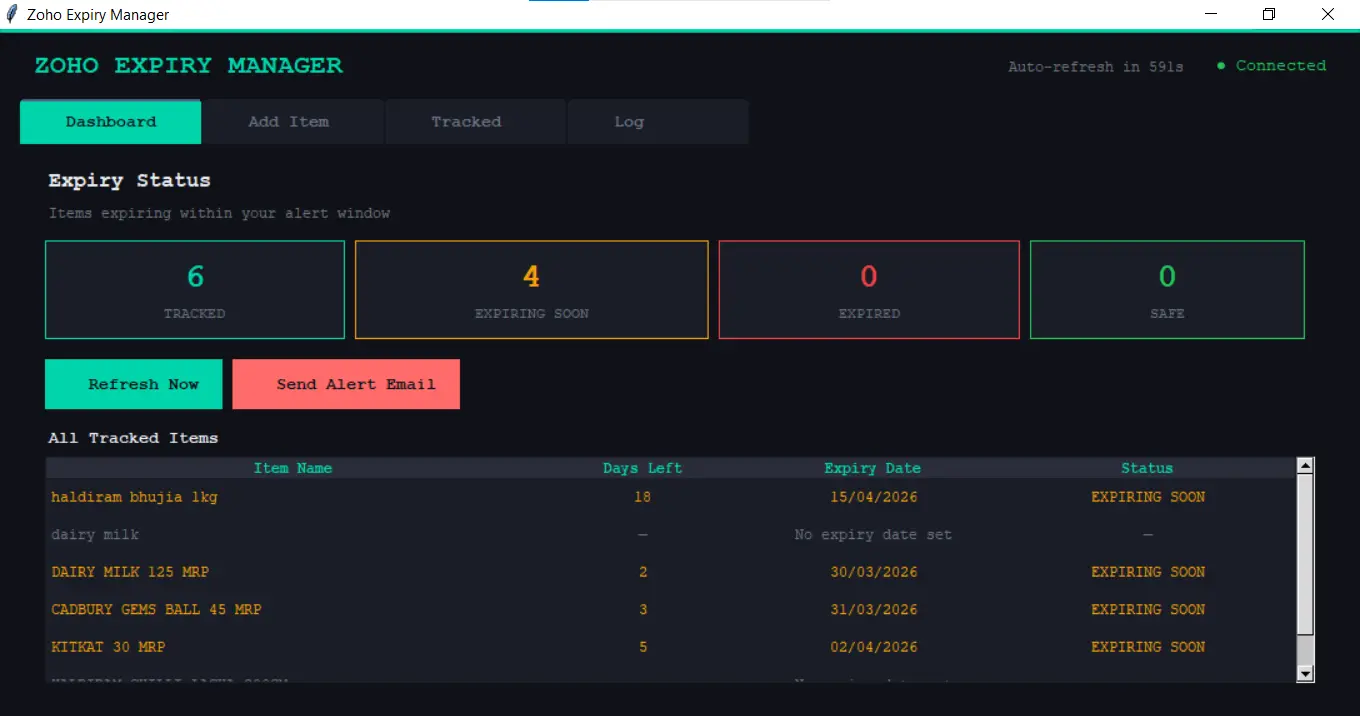
Check Python expiry alerts
The morning alert from the Zoho expiry script runs automatically. I open the dashboard, check what’s in the 🟠 Urgent (3 days) and 🟡 Watch (7 days) columns. That’s today’s deal candidate.
Open ChatGPT — paste the broadcast prompt
Copy-paste the near-expiry prompt (below) with today’s product, quantity, and discount filled in. Get 3 message options back. Takes 90 seconds.
Edit and personalise
Pick the best of the 3 options. Change anything that sounds too formal or too generic. Add one specific detail that only your store would know. Add the opt-out line at the end.
Send the broadcast
Open WhatsApp Business → Broadcast Lists → your list → send. Done. Go open the shop. The responses come in over the next 2–3 hours.
2-minute check: what sold, what didn’t
Did the broadcast item sell out? How quickly? Did people buy anything else? Note it in a simple Google Sheets row. This data feeds next week’s decision.
That’s the whole system. 15 minutes on Tuesday. 2 minutes on Thursday. Nothing else. I’ve run it for 16 consecutive weeks without missing once — which is more consistency than I’ve ever managed with any other marketing habit.
📱 Want the exact broadcast templates?
All 5 types — copy-paste ready, with ChatGPT prompts and a weekly tracking log. Free download below.
🤖 Related: The ChatGPT prompts I use every Tuesday are part of my full ChatGPT prompts for retail store owners library — 25 prompts tested in my real store.
The 5 Broadcast Types That Actually Work
I tested more than these 5. Most of them either got ignored or generated the wrong kind of engagement (people asking questions I then had to answer, which is fine but time-consuming). These are the 5 that consistently drive customers into the store.
All five of these connect directly to what’s happening in your inventory. If you’re not tracking near-expiry items yet, the food waste reduction guide covers the full system — including the Python expiry alerts that feed Type 1 broadcasts every Tuesday morning.
The Exact ChatGPT Prompts I Use — Copy Paste Ready
These aren’t generic templates. They’re the prompts I have saved in a note on my phone. Every bracket is where you fill in your specific store detail. The more specific you are, the better the output — ChatGPT with real numbers always beats ChatGPT with vague descriptions.
💰 New user bonus
The Type 1 broadcasts work best when you’re already tracking expiry dates in Zoho Inventory. Sign up free and get $100 in Zoho Wallet credits — free plan stays free, credits apply if you ever upgrade.
Try Zoho Inventory Free → Get $100 CreditsWhat Failed — 3 Real Mistakes (One Nearly Got Me Banned)
These happened. I’m including them because they’re more useful than the success stories.
Mistake 1 — Sending 3 broadcasts in one week
It was the week before Diwali. I sent a near-expiry broadcast on Tuesday, a Diwali prep broadcast on Thursday, and a “last chance” reminder on Saturday. The Tuesday message got 40+ responses. Thursday: 18. Saturday: 4 responses and 3 requests to be removed from the list. I’d trained people to stop paying attention in 5 days. Took 3 weeks to recover engagement. Now: maximum 2 per week, minimum 4 days apart.
Mistake 2 — Sending at 2pm (nearly triggered a ban)
One week I was busy in the morning and sent the broadcast at 2pm. The read rate was half of normal. Worse — 2 people blocked the number. 2 blocks in one message is enough for WhatsApp’s algorithm to flag you. I didn’t get banned but my delivery rate dropped for the next two weeks while the algorithm watched me. Morning sends (7am–9am) or evening (6pm–8pm) are when people actually check messages. 2pm is when everyone is working, eating, or napping.
⚠️ Blocks are the real danger: WhatsApp’s 2025/26 policy tracks blocks and reports per account. Two blocks in a single broadcast can trigger automated monitoring. Five blocks across any rolling period can reduce your sending ability. Always include the opt-out line — people who want to leave need an exit that isn’t the block button.
Mistake 3 — Using ChatGPT’s first output without editing
Early on I was lazy about the editing step. One message went out that said “Dear valued customers, we are pleased to inform you of an exclusive limited-time offer on premium dairy products.” Vishal read it and said nothing. Three of my regulars replied asking if someone else had taken over the shop. ChatGPT’s default sounds like a corporation. Always run Prompt E on anything that doesn’t sound like you before sending.
For US and UK Store Owners — WhatsApp Doesn’t Work the Same Way
In India, WhatsApp is the primary communication channel — it’s what people check before email, before SMS, sometimes before phone calls. In the US and UK, WhatsApp has around 30–40% adoption, concentrated in immigrant communities and younger demographics.
If you’re running a grocery store in the US or UK, the same system works — but the channel changes. Use SMS instead of WhatsApp. The logic is identical: short, personal, timely, one specific item or update, easy opt-out. The timing and frequency rules are the same.
For SMS in the US, use Brevo (free tier: up to 300 messages/day) or Twilio (pay-per-message, around $0.0075/SMS). The ChatGPT prompts above work identically — just replace “Hinglish” with “casual American English” or “friendly British English” depending on your location.
💡 US/UK legal note: Replace the opt-out line with “Reply STOP to unsubscribe” — this is the legally required format for SMS marketing in both the US (TCPA compliance) and UK (PECR). In India this isn’t legally mandated yet, but it’s still good practice for the same practical reasons.
Before & After — What This System Did at gharstuff.com
| Metric | Before WhatsApp system | After 16 weeks |
|---|---|---|
| Average Tuesday revenue | Baseline | +28% vs baseline |
| Near-expiry items wasted | ~₹4,000/month | ~₹900/month (77% less) |
| Broadcast response rate | ~12% (when I sent manually) | 38–42% average |
| Time spent on marketing | 0 (did nothing) | 15 min/week |
| Festival pre-orders | 0 | 15–30 per festival |
The 28% Tuesday revenue increase sounds large. It is large. It’s also partly because my pre-WhatsApp Tuesday was genuinely slow — the broadcast turned it into my most consistent day. If your Tuesdays are already good, the gain will be different. But the waste reduction numbers hold regardless — near-expiry broadcasting is the most reliable part of this system.
For context on the full inventory and waste system behind this, the free AI tools guide shows how all the pieces connect, and the get more customers guide covers the 9 other methods I use alongside WhatsApp.
FAQs — AI WhatsApp Marketing for Small Grocery Store
Q1: Do I need WhatsApp Business or can I use regular WhatsApp?
Q2: How do I build a broadcast list without annoying people?
Q3: What’s the best time to send a broadcast?
Q4: How many broadcasts per week is too many?
Q5: Can I automate WhatsApp broadcasts completely?
Q6: What if someone asks to be removed?
Q7: Does this work for US or UK grocery stores?
Q8: Is there any risk of getting my WhatsApp number banned?
📥 Free Download — WhatsApp Broadcast Templates + Full Toolkit
📥 Free Toolkit — WhatsApp Broadcast Templates + ChatGPT Prompts + More
Everything mentioned in this article — all 5 broadcast templates copy-paste ready (Excel with tracking log), the ChatGPT prompt library PDF, AI Waste Tracker, GBP Optimization Toolkit, and Zoho Expiry Alert. Free, no credit card.
Free. No spam. Unsubscribe anytime.
Your Move — One Broadcast This Tuesday
Don’t try to build a list, set up a system, and write 5 message types all at once. Do one thing this Tuesday:
- Find one item in your store that’s expiring in the next 3–5 days.
- Open ChatGPT, paste Prompt A with that product’s details.
- Pick the best of the 3 messages, add your opt-out line, edit anything that doesn’t sound like you.
- Send it to whoever you have on WhatsApp — even if it’s just 20 people.
- Count what happens.
That’s the whole experiment. One message, one item, one morning. If it works — and it probably will, even at small scale — you’ll have enough evidence to make it a weekly habit.
If you want the inventory tracking system that feeds this (so you always know what’s expiring and what to broadcast about), start with the Zoho Inventory setup guide — the free Python expiry alert script is in there and it’s what runs every morning at 7am before I write my Tuesday message.

About the Author
Rahul Saini
Grocery store owner in Hisar, India, running gharstuff.com since 2019 with 800–1,200 SKUs daily. I test AI tools in my real store — with real staff, real customers, and real consequences when something doesn’t work. Every number on this site is from my actual store.
Read My Full Story →Related Articles
Last updated: April 2026. WhatsApp policy information verified April 2026. Author: Rahul Saini, SmallRetailAI.com.
What’s the one product you’d broadcast first? Let me know in the comments — I read every one.