
🔄 Last updated: April 12, 2026
These AI tools for small retail USA have been validated by a store owner who tested them in real conditions before recommending them to American retailers. This is my honest answer to every US store owner who’s asked me whether AI tools for small retail USA work the same way they do in my Indian grocery store — and what you need to do differently.
Every week, at least a few store owners from the US, UK, or Australia read something on this site and send me a version of the same message: “This is useful — but you’re in India. Does any of this actually apply to my store in [city]?”
It’s the right question. And I’ve been giving a half-answer by just saying “yes, the tools work everywhere.” That’s technically true but not the whole picture.
The honest answer is: some of my setup transfers directly, some of it needs adjustment, and some of what I use is genuinely the wrong choice for a US store. Nobody on this site has said that clearly yet — including me. So this article fixes that.
I’m going to go through every major tool and system I use in my grocery store in Hisar and tell you exactly what happens when a US store owner tries to use the same setup. Where it works identically. Where you need to do something differently. And where I’d actually tell you to ignore what I do and use something else entirely.
Now. Here’s what that setup looks like when you move it 8,000 miles west.
Which AI Tools for Small Retail USA Work Identically to My Indian Store
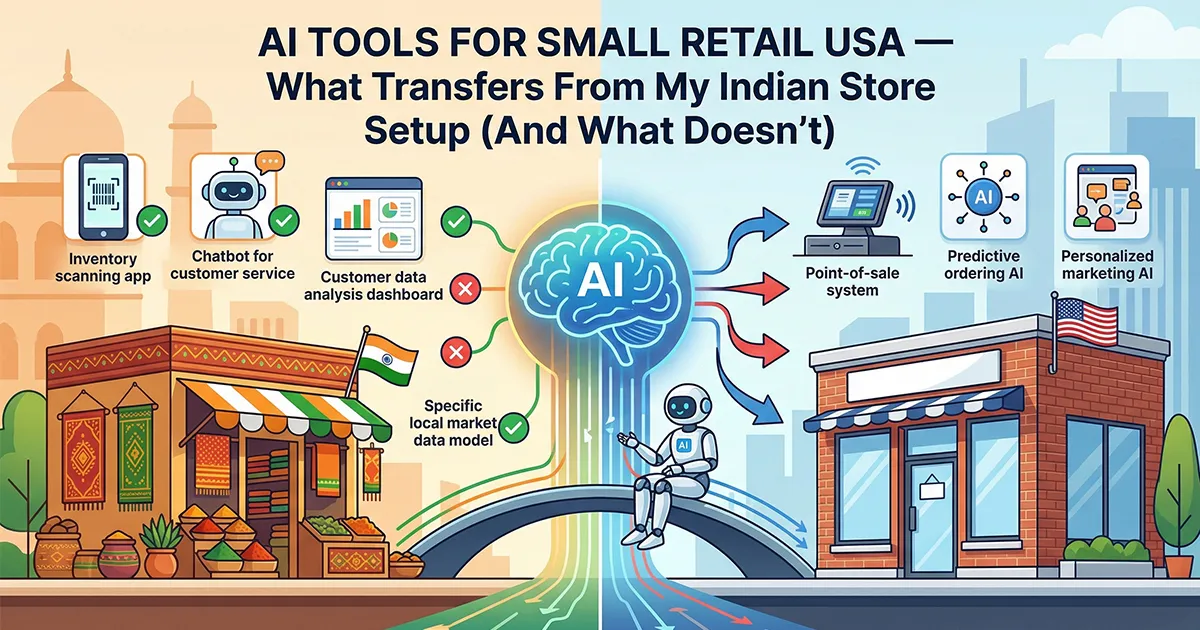
Before the detail: here’s the summary. Every tool I use, and whether it transfers to a US store as-is, needs adjustment, or should be replaced with something better suited to the US market.
| Tool I Use in India | What I Use It For | For US Stores | Verdict |
|---|---|---|---|
| Zoho Inventory | Stock tracking, reorder alerts, purchase orders | Identical — US data center, same free plan | ✅ Transfers directly |
| ChatGPT | Weekly order forecasting | Works better — handles US holidays natively | ✅ Transfers + improves |
| Google Business Profile | Local search visibility | Stronger — higher English search volume | ✅ Transfers + improves |
| Google Sheets | Daily waste tracking, custom formulas | Identical | ✅ Transfers directly |
| Google Lens | Expiry date + barcode scanning | Identical | ✅ Transfers directly |
| Python Expiry Alert System | Automated daily expiry emails from Zoho | Works — but setup guide needs US timezone note | ⚠️ Transfers with one tweak |
| Canva | Discount signs, WhatsApp images | Works — but output channel changes (see below) | ⚠️ Tool transfers, use changes |
| WhatsApp Business | Near-expiry discount broadcasts to customers | Wrong tool — US customers don’t use WhatsApp | ❌ Replace with SMS or email |
| Zoho Books (free) | Basic bookkeeping for India | Use Wave Accounting instead — better US fit | ❌ Replace for US stores |
| Wave Accounting | I mention it but don’t use it (India fit is poor) | Actually your best free accounting option | ✅ Better for US than for me |
Plus two tools at the end that US stores should add that I genuinely can’t use: Square for Retail and a proper SMS tool. Neither is available or practical in my market.
Here is the full comparison of the best ai inventory tools in detail.
AI Tools for Small Retail USA — What Transfers Directly From My Setup
These AI tools for small retail USA work identically to my setup, same free plan, same results. The only difference is your currency is already dollars — you don’t need my ₹ to $ conversions.
Zoho Inventory — The Core of My Setup
🇮🇳 My store in India
Free plan. 1 user, 50 orders/month. I use it for reorder point alerts, purchase orders to 6 suppliers, and expiry date tracking via custom fields. Saved 8 hours/week from manual counting. Caught 23 near-expiry items in week 1.
🇺🇸 Your store in the US
Identical free plan. Select the US data center during signup for faster load times. Same reorder alerts, same purchase orders, same free plan limits. At US labor rates ($15–18/hr), the 8 hours/week saved is worth $480–$576/month at zero cost.
💰 New user bonus
Sign up through this link and get $100 in Zoho Wallet credits — use them toward any Zoho subscription. Free plan stays free. Credits apply if you ever upgrade.
Try Zoho Inventory Free → Get $100 CreditsThe inventory management software for small business question I get most from US owners is whether Zoho’s free plan is actually usable or just a marketing tease. I’ve been on it for 6+ months without upgrading. The 50 orders/month limit sounds tight until you realise a Zoho “order” means a purchase order to a supplier — not a customer sale. Most small stores place 5–15 purchase orders a month. You’ll have room to spare.
💡 One genuine US advantage: Zoho integrates with Shopify, QuickBooks, and Amazon — all tools more commonly used by US retailers than Indian ones. If you’re running any ecommerce alongside your physical store, those integrations work on the free plan.
The only thing I’d do differently for US setup vs my own: when you sign up, choose United States as your data region. I’m on the India region. Your data loads faster from a US server and stays under US data law.
Full setup guide with the free Python expiry alert workaround: Zoho Inventory Setup Guide for Small Retail
ChatGPT for Weekly Order Forecasting — Actually Better for US Stores
🇮🇳 My store in India
Every Monday I paste 4 weeks of sales data for my top variable-demand products and ask ChatGPT how much to order. It accounts for Diwali, Holi, cricket matches, and local school schedules. Hit 85% order accuracy by week 4.
🇺🇸 Your store in the US
Same prompt, same process — but ChatGPT’s training data for US holidays is richer than for Indian ones. Thanksgiving week, 4th of July, Super Bowl Sunday, back-to-school season — it handles all of these well. Your forecasting accuracy will likely be higher than mine from week 1.
I felt slightly ridiculous the first time I typed my milk sales into a chatbot. Then it predicted a slow week correctly and I stopped feeling ridiculous. The prompt I use every Monday hasn’t changed in months:
Week 1: X units · Week 2: X units · Week 3: X units · Week 4: X units
Next week: [any holiday, local event, or weather note].
How many units should I order to avoid stockouts while minimising waste?
For US stores: add weather to that prompt. A cold snap in Chicago changes beer and snack sales differently than it does in Phoenix. ChatGPT will factor it in if you mention it. I don’t have that variable — Hisar weather is fairly predictable. You do.
Full ChatGPT prompt library: How I Reduced Food Waste by 35% Using Free AI Tools
Google Business Profile — Stronger in the US Than in My Market
🇮🇳 My store in India
Went from 0 to 150+ monthly searches in 30 days. Now 400+ at 90 days. 10+ new walk-in customers per month from Google Maps alone. The tool that surprised me most — I expected almost nothing from it.
🇺🇸 Your store in the US
Google has more local search data for English-language US markets than anywhere else. A well-maintained profile in a mid-size US city can dominate “near me” searches faster than my experience in Hisar. Your competition is also likely less active on GBP — most US small stores set it up once and forget it.
The uncomfortable truth: your competitor down the street might run a better store than you — but if their GBP profile hasn’t been updated in 8 months and yours gets a new photo and a post every week, you will outrank them for every “near me” search in your area. That’s not theory. That’s what happened to me against stores that have been in Hisar far longer than I have.
Here is the google business profile Full setup guide — works identically in the US →
📍 One US-specific note: If you get a question from US customers about something like “do you accept EBT?” or “are you open on Thanksgiving?” — answer it in your GBP Q&A section. Google now surfaces these answers directly in search results. It takes 2 minutes and it’s the kind of information US shoppers search for before they walk in.
What Needs Adjustment — Same Tool, Different Approach
These tools work in the US. But the way I use them in my store doesn’t map cleanly to a US context. You’ll get better results if you adapt rather than copy.
Canva — The Tool Transfers, But What You Do With It Changes
🇮🇳 My store in India
I use Canva to make discount graphics — near-expiry paneer at 30% off, slow-moving snacks. Then I broadcast the image directly to regular customers via WhatsApp. Works brilliantly. 78% of near-expiry stock now sells instead of going to waste.
🇺🇸 Your store in the US
Canva is just as good for making the graphics. But most US customers won’t be on your WhatsApp list — and many won’t want to be. Use the same Canva graphics, but distribute via SMS (Brevo or SimpleTexting), email, or as Instagram Stories. Same tool, different delivery.
The discount sign use case is identical everywhere — I use Canva to make a clean in-store sign in 5 minutes instead of writing on cardboard. That transfers with zero changes. The near-expiry broadcast system is where you need to swap the channel, not the tool.
The Python Expiry Alert System — Works in the US With One Timezone Note
🇮🇳 My store in India
Reads Zoho Inventory data via the free API every morning. Emails me a color-coded list — 🔴 expired, 🟠 3 days, 🟡 7 days, 🟢 safe. Runs automatically on Windows Task Scheduler. I built this over 2 days because Zoho charges $39/month for this feature on paid plans.
🇺🇸 Your store in the US
Same script, same setup. The one thing to check: in the configuration file, set your timezone to your US timezone (America/New_York, America/Chicago, America/Denver, or America/Los_Angeles). The script uses IST by default. Change that line and the daily email arrives at the right time.
Everything else in the setup guide works identically. Zoho’s US data center, the free API, the 1,000 free API calls per day — none of that changes. The full setup guide with the download files is in the Zoho setup article. The timezone line is clearly labelled in the config file — you won’t miss it.
💡 What this saves a US store owner: Zoho Standard is $39/month. At US labor rates, catching one near-expiry event per week that saves you from dumping $30 of product pays back $120/month. The Python system does this for $0 and a 2-hour one-time setup.
What Doesn’t Transfer — Where My Setup Is Wrong for US Stores
This is the section I should have written months ago. These are the parts of my setup where copying what I do would actively give you worse results than using the right tool for your market.
WhatsApp Business — The Biggest Mismatch
🇮🇳 My store in India
WhatsApp is how India communicates. Every customer has it. My regular customers opted into my broadcast list voluntarily. When paneer is 3 days from expiry, I send one broadcast — 30% off, photo attached, gone within the day. This is my single biggest waste reduction tool.
🇺🇸 Your store in the US
WhatsApp penetration in the US is around 25–30% of adults — mostly in Hispanic communities and among people with international contacts. Most US customers will find a WhatsApp message from a store they shop at strange or intrusive. Don’t build your customer communication on a platform most of them don’t use.
The underlying system — near-expiry alert triggers a discount broadcast to loyal customers — is exactly right for US stores too. You just need a different pipe to send it through.
What to use instead:
- SMS via Brevo free tier — 9,000 emails/month free, and Brevo now includes SMS capabilities. Most US adults read SMS within 3 minutes. Opt-in rates for retail SMS lists are higher than email.
- Email via Brevo — slower response than SMS but better for detailed offers, weekly newsletters, and customers who’ve given their email at checkout.
- Instagram Stories — if you have even a small local following, a “flash discount” story post moves near-expiry product faster than you’d expect. Free, takes 2 minutes with the Canva graphic already made.
⚠️ The system I’d build for a US store: Zoho alerts me → I make a Canva graphic → I send an SMS blast via Brevo to opted-in customers → I post the same image as an Instagram Story. That’s the US version of my WhatsApp workflow. Same logic, three different channels instead of one.
Zoho Books vs Wave Accounting — I Have This Backwards For US Stores
🇮🇳 My store in India
Zoho Books free tier handles Indian GST, integrates with Indian bank accounts, and works with Indian CA (chartered accountant) workflows. It’s the right tool for my market. Wave has poor Indian bank integration and doesn’t handle GST well.
🇺🇸 Your store in the US
Wave Accounting is genuinely excellent for US small retail. Free forever, unlimited invoicing, AI receipt scanning that reads supplier invoices automatically, and direct US bank account import. At year end, your profit/loss is already calculated. Wave was built for the North American market.
When I wrote about Wave in my 15 free AI tools article, I noted it works better in the US than in India. I understated that. For a US store owner doing bookkeeping manually — or paying someone to do it — Wave eliminates 2–3 hours of work per month at zero cost. That’s $30–54/month in recovered labor at US rates.
If your accountant specifically requires QuickBooks, that’s a different conversation. But if you’re choosing a free bookkeeping tool from scratch, Wave is your answer as a US store owner.
Tools US Stores Should Add That I Simply Can’t Use
These don’t exist in my setup because they’re built for US-specific infrastructure — payment rails, hardware ecosystems, banking integrations that don’t exist in my market. They’re worth adding to a US store precisely because I can’t give you a direct comparison.
Square for Retail — The US Store’s Head Start
Square is simply not available in India in any meaningful way. US store owners have access to a free POS + inventory system that automatically deducts stock on every sale — meaning your inventory counts stay accurate without any manual work between purchase orders.
What I have to do manually: at the end of each day, Vishal reconciles what was sold against what Zoho shows. It takes 20–30 minutes. Square eliminates that entirely for US stores. Every sale at the register updates your stock count in real time.
🇮🇳 My workaround
Daily manual reconciliation. Vishal counts against Zoho. Takes 20–30 min/day. Not elegant, but it works. No Square equivalent exists for my market.
🇺🇸 What you can do
Square free plan: unlimited products, real-time stock deduction on sale, free card reader, sales tax by US state. First transaction in 30 minutes. Saves the daily reconciliation entirely.
Important honest note: Square’s free inventory is basic — no expiry tracking, no reorder alerts, no purchase orders. For a grocery or convenience store with perishables, run Zoho alongside Square. Square handles the POS and real-time stock deduction. Zoho handles expiry alerts and purchase orders. The overlap is small, the combined value is large, and the combined cost is still $0.
📋 The stack I’d run if I were opening a US store tomorrow: Square for Retail (POS + real-time stock) + Zoho Inventory (purchase orders + expiry alerts) + ChatGPT (weekly forecasting) + Google Business Profile (local search). Total cost: $0.
SMS Customer Communication — The US Version of My WhatsApp System
Brevo’s free plan gives you 9,000 emails/month with unlimited contacts — that part I mentioned in my free tools article. What I didn’t emphasise enough for US stores: Brevo also handles SMS, and SMS in the US has open rates above 90%. Email sits around 20%.
The workflow I’d build: collect customer phone numbers at checkout (just ask — “can I text you when we have deals?”). Most regulars say yes. Build a list of 50–100 opted-in customers over your first month. When Zoho or the Python alert tells you something is near expiry, make the Canva graphic, send the SMS blast via Brevo. Same system I run on WhatsApp — different pipe, higher open rate for a US audience.
This isn’t something I’ve tested in my store. I’m giving you the logical US adaptation of something that works well for me on WhatsApp. The underlying mechanic — alert → discount → broadcast to regulars → sell instead of waste — is identical. Your US customers just live in their SMS inbox, not their WhatsApp.
The Number That Changes Everything in the US
I’ve saved this for near the end because it reframes every tool comparison above. The tools are identical. The ROI is not.
In my store, I pay staff roughly $3–4/hour. When Zoho Inventory saved me 8 hours a week of manual counting, the labor value recovered was $24–32/week — around $100–130/month.
At US minimum wage — which ranges from $7.25 federally to $17+ in California and Washington — that same 8 hours is worth $60–140/week, or $240–600/month. At the median small retail wage of around $15/hour, it’s $480/month. From a free tool.
| Tool | Time Saved/Week | My India Value | US Value at $15/hr | US Value at $18/hr | Monthly Cost |
|---|---|---|---|---|---|
| Zoho Inventory (free) | 6–8 hrs | ~$100/mo | $360–480/mo | $432–576/mo | $0 |
| ChatGPT (free) | 2–3 hrs | ~$40/mo | $120–180/mo | $144–216/mo | $0 |
| Python Expiry Alerts (free) | 1–2 hrs + waste | ~$25/mo | $60–120/mo labor | $72–144/mo labor | $0 |
| Square for Retail (free) | 3–4 hrs (reconciliation) | N/A in India | $180–240/mo | $216–288/mo | $0 + txn fees |
| Zoho Standard (paid) | 10+ hrs total | ~$130/mo | $600+/mo | $720+/mo | $39/mo |
Time saved estimates from 60+ days of real testing in my store. Labor values are calculated at stated rates — your actual savings depend on how much of the saved time translates to reduced paid labor hours vs more time for other tasks.
The point isn’t the exact numbers. It’s that the tools that feel marginal in my market are obvious decisions in yours. A $39/month Zoho Standard plan that saves your employee 10 hours a week pays back 15x at US wages. I have to think harder about whether it’s worth it. You don’t.
✅ The practical conclusion: Every free tool I use in my Indian store is worth more to a US store owner than it is to me. And every paid upgrade that I’ve hesitated to recommend — because the math is tight at Indian labor rates — is a clear yes at US labor rates. Start with the free stack. The ROI case for upgrading will make itself within 30 days.
So — Does My Indian Store Setup Apply to Your US Store?
Mostly yes. With three specific changes.
✅ Copy directly from my setup
- Zoho Inventory free plan — identical setup, choose US data center
- ChatGPT Monday ordering prompt — works better for US holidays
- Google Business Profile — stronger in your market than mine
- Google Sheets + Lens — no changes needed
- Python expiry alerts — change timezone in config, done
- Canva for discount signs — identical use case
❌ Don’t copy these from my setup
- WhatsApp Business for customer broadcasts — use SMS or email instead
- Zoho Books for accounting — use Wave Accounting instead
- Skipping Square — you have access to a free POS I don’t have
- My labor cost math — yours is 4–5x higher, recalculate everything
The AI tools for small retail USA covered here — Zoho, ChatGPT, Google Business Profile, the Python workaround — transfer cleanly. The surrounding infrastructure (how you talk to customers, how you handle accounting, what POS you use) needs adapting for the US market.
If you’re setting up from scratch: spend Saturday on Zoho Inventory, Sunday on Google Business Profile, and the following Monday morning using ChatGPT for your first order. That’s what I’d do if I were opening a store in Ohio tomorrow. Total cost: $0. And the ROI at your labor rates is better than mine was.
📥 Free Toolkit — The Files From My Real Store
AI Waste Tracker (Excel) · Inventory Toolkit · Python Expiry Alert System · GBP Optimization Toolkit. All four files, instant access, no credit card.
Free. No spam. Unsubscribe anytime.

About the Author
Rahul Saini
Grocery store owner in Hisar, India, running gharstuff.com since 2019 with 800–1,200 SKUs daily. I test AI tools in my real store — with real staff, real customers, and real consequences when something doesn’t work. Every number on this site is from my actual store.
Read My Full Story →Last updated: April 2026. Author: Rahul Saini, grocery store owner and founder of SmallRetailAI.com. Running a specific type of US store and want to know exactly how my setup maps to yours? Ask in the comments — I read every one.
You’re in India — does your Zoho setup actually work for a US store?
the AI tools for small retail USA I recommend start with selecting the United States data region when you sign up. Everything else — the free plan limits, the reorder alerts, the purchase orders, the Python expiry alert workaround — works identically. I’ve had US store owners follow my Zoho setup guide exactly and report the same results.
What’s the biggest mistake US store owners make when copying my setup?
Using WhatsApp for customer communication. WhatsApp has around 25-30% penetration in the US — most of your customers won’t be on it or won’t want a store texting them there. Replace my WhatsApp broadcasts with SMS via Brevo or email. Same workflow, same near-expiry discount logic, channel that actually reaches US customers.
Is Zoho Inventory really better than Square for a US grocery store?
They’re not competing — they do different things. Square is a POS that auto-deducts stock on every sale. Zoho tracks purchase orders, sets reorder points, and handles expiry date monitoring. A US grocery store ideally runs both: Square at the register, Zoho for supplier orders and expiry alerts. Combined cost: $0. I can’t run Square in my Indian store — US owners have an advantage here.
Does the labor cost math really change which tools are worth paying for?
Completely. At Indian labor rates, I think hard before recommending a $39/month paid upgrade. At US minimum wage in states like California or Washington, 8 hours of saved weekly labor is worth $500+ per month. That makes the same $39 Zoho Standard plan a 12x return. Tools I consider ‘borderline worth it’ in my market are obvious decisions in yours. Always run the math at your actual labor cost.
What accounting tool should a US small retail store use?
Wave Accounting — it’s free forever, handles US bank imports automatically, uses AI to read and categorise supplier invoices from a photo, and produces a monthly profit/loss with no manual data entry. I use Zoho Books in India because Wave doesn’t support Indian banking well. For US stores, Wave is the right free choice. If your accountant requires QuickBooks specifically, that changes the answer — but if you’re choosing from scratch, start with Wave.
How long will it take to see results if I follow your setup?
Google Business Profile: new customers within 1–2 weeks of a complete profile. Zoho reorder alerts: active from day one. ChatGPT order accuracy: improves over 4 weeks as you feed it real data — don’t judge it in week 1. Python expiry alerts: working from the first morning after setup. I saw measurable food waste reduction within 2 weeks of running Zoho and the Python alerts together. Your results will depend on your store type and how consistently you use the tools.