
🔄 Last updated: April 15, 2026
This guide covers the best free AI tools small retail — tested in a real grocery store with 1,200+ SKUs, not written from a coffee shop by a tech blogger.
Tested in my real grocery store • Verified free tiers • No paid tools • No fluff
⚡ Quick Verdict – Best Free AI Tools Small Retail (2026)
Zoho Inventory
Best Overall
Google Sheets
Best for Tracking
ChatGPT
Best for Forecasting
Google Lens
Best for Scanning
Canva
Best for Marketing
📚 Table of Contents
The Grocery Store Experiment — Why I Tested Only Free Tools
I ran my grocery store for 60 days using only free AI tools small retail. I haven’t paid a cent for software. Here’s exactly what happened to my margins.
Every “best AI tools” list online is written by tech bloggers who’ve never worked a cash register. They recommend tools that look good on a spreadsheet but fall apart in a real shop where your phone rings, a customer asks a question, and Vishal is waiting for instructions all at the same time.
I tested 20+ tools over 60 days in my grocery store in Hisar — 1,200+ SKUs, 2 staff, real customers, real chaos. These 15 made the cut. Six tools I tested didn’t make it, and I’ll tell you exactly why.
The Rahul Guarantee: Every tool on this list was used in my real store with Vishal, my staff member. If he couldn’t figure it out in under 30 minutes without asking me for help — it didn’t make the list. That’s the only test that matters in a busy retail store.
After spending 60 days testing the best AI inventory tools for small retail, I knew which tools worked for stock management. This article goes wider — covering every area of running a small retail store, from inventory to marketing to accounting, all at zero cost.
How I Tested These Tools — Real Methodology
I didn’t just install these tools and read the feature pages. I used them during actual business hours, with real stock arriving, real customers waiting, and real staff who don’t have time for complicated software.
| Test Criteria | What I Measured |
|---|---|
| Setup time | Minutes from sign-up to first useful result |
| Free tier limits | SKUs, orders, users, features — the real numbers |
| Real results | Waste reduced, time saved, money saved |
| Staff adoption | Could Vishal use it without training? |
| Device | Android phone + Windows laptop |
| Honest free tier | Forever free — not a trial disguised as free |
Tools that failed: Oracle NetSuite (built for enterprises), Cin7 (14-day trial then $349/month), Inventory Planner (paid only), and two “AI tools” that were just rebranded spreadsheets with a chatbot wrapper. I’ll cover the full failures list later.Category 1 covers free AI tools small retail stores need for inventory management.
📦 Category 1: Inventory & Stock Management (5 Free Tools)
This is where the biggest money is lost and saved. Get inventory right and everything else follows.
1. Zoho Inventory Free Tier — Best Overall
If you sell anything with an expiry date — milk, bread, produce — this is the single most important tool on this list. The free plan includes reorder point alerts, purchase orders, and barcode scanning. Three features that most tools charge $30–50/month for. Zoho’s official pricing page
In my first week, Zoho caught 23 near-expiry items I would have missed. That’s 23 items that went to my discount shelf instead of the bin. Over 60 days, I reduced food waste by 35% and saved $180/month. Full results in my food waste reduction guide. If you want to see how Zoho compares against paid tools like Sortly, the full 7-tool comparison including paid options covers the complete picture.
💡 Pro tip: Set alerts for 7 days before expiry (warning) and 3 days before expiry (move to discount shelf). This single feature drove my 35% waste reduction.
What Works
- Forever free — not a trial
- Reorder alerts on free plan
- Purchase orders included (50/month)
- Barcode scanning included
- API access enables free workarounds
- Stable pricing history
What Doesn’t
- Complex dashboard initially
- CSV import requires specific format
- Only 1 user on free plan
- Automated batch tracking is paid
- Setup takes a full Saturday afternoon
📖 Full setup guide: Zoho Inventory Setup Guide for Small Retail — includes the free Python expiry alert workaround.
2. My Free Python Expiry Alert System — Most Unique Tool on This List
Python Expiry Alert System
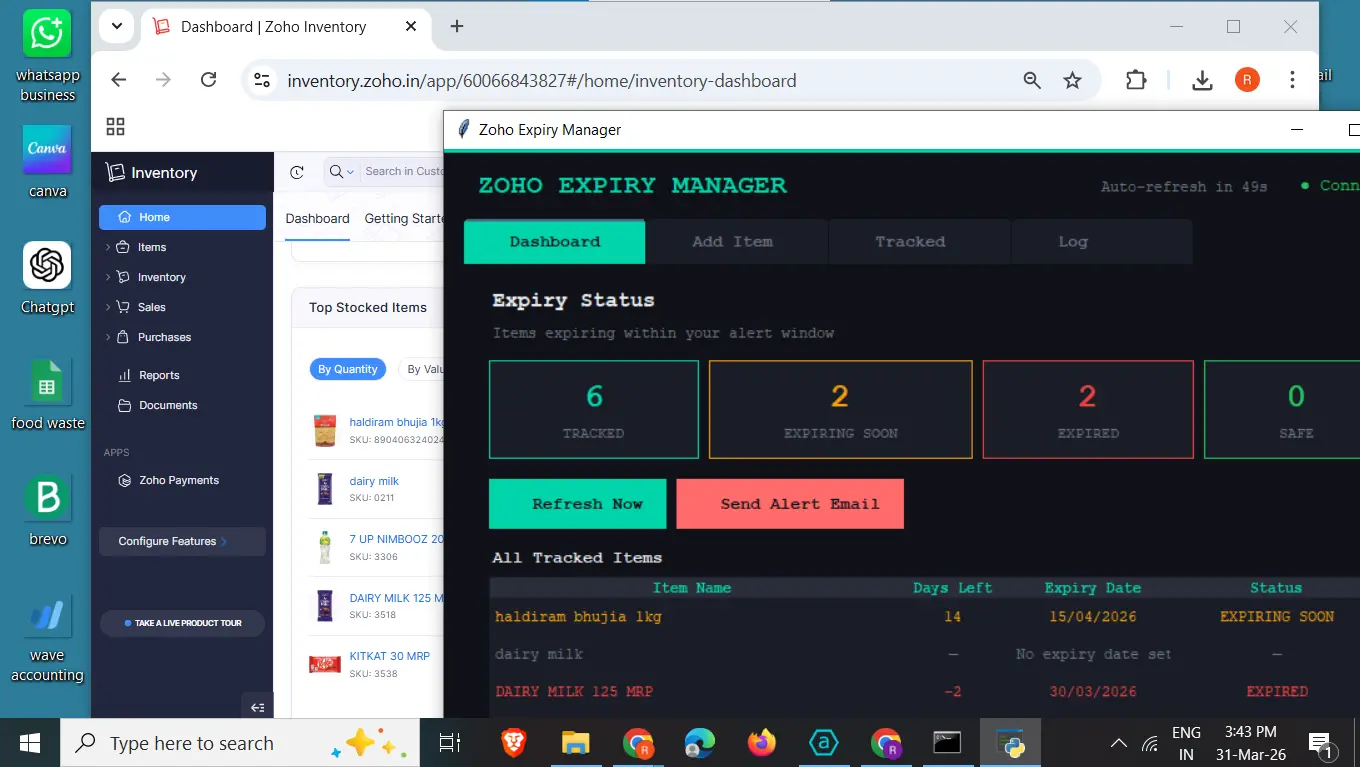
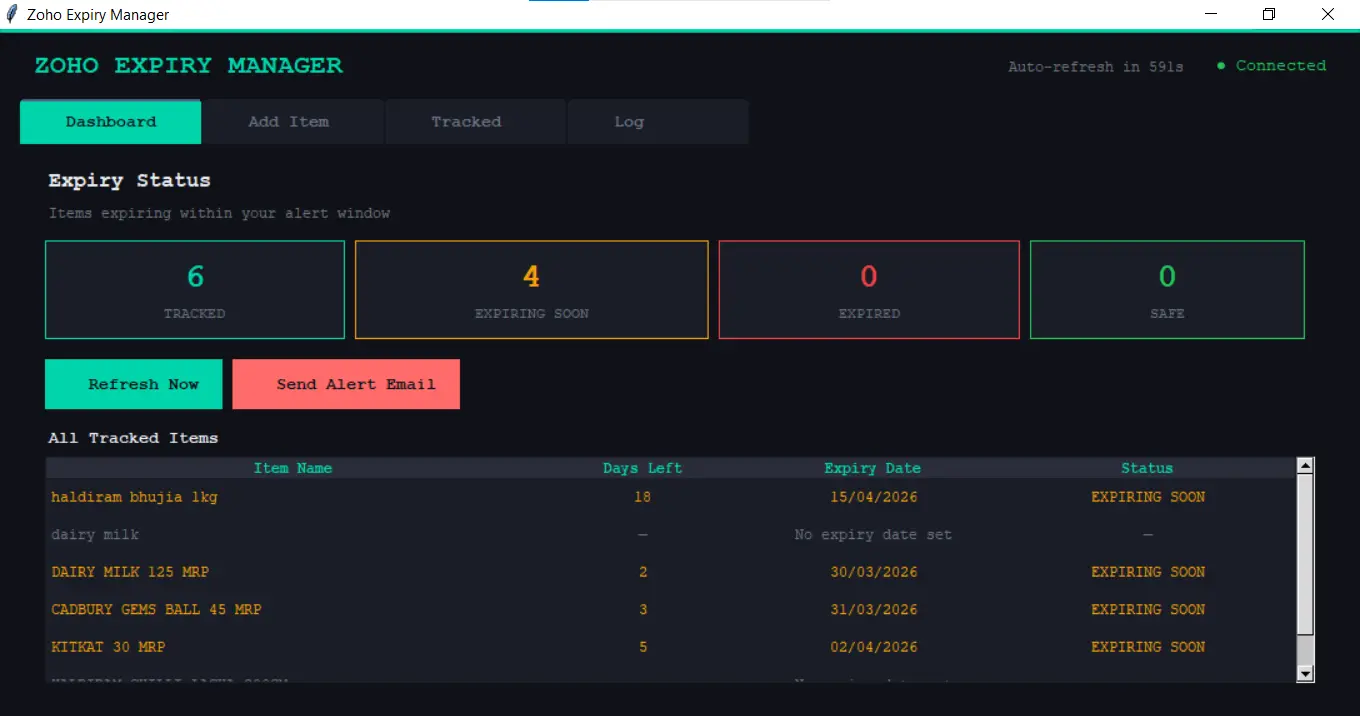
This one doesn’t exist anywhere else online. I spent 2 days building it after discovering that Zoho’s automated expiry alerts require the paid plan ($39/month). The Python script reads your Zoho Inventory data via the free API, checks which items are expiring within 7 days, and emails you every morning automatically.
The desktop dashboard shows a color-coded list — 🔴 expired, 🟠 urgent (3 days), 🟡 watch (7 days), 🟢 safe. Works on Windows Task Scheduler and Mac launchd. Runs whenever you turn on your computer — no need to leave it on overnight.
💡 What this replaces: Zoho Standard plan costs $39/month. This Python system does the same expiry alert job for $0. That’s $468 saved every year.
📥 Download the Python files free: Get the Zoho Free Expiry Alert System — full setup guide for Windows and Mac included.
3. Google Sheets with AI Formulas — Best Free Tracker
Google Sheets
I know. Spreadsheets. But hear me out — Google Sheets with AI formulas is not the same as the Excel file you abandoned in 2019. I asked ChatGPT to write the formulas for me in 5 minutes, and now my sheet highlights in red every product trending toward waste. Google Sheets official site
Three formulas do all the work: AVERAGE for typical sales, IF for low stock flags, and conditional formatting that turns rows red when expiry is within 7 days. Result: overstock reduced by 22% in 60 days.
The shortcut: Prompt I used — “I have a Google Sheet with columns: Product, Sales Last Week, Current Stock, Expiry Date. Write me a formula that highlights the row red if Expiry Date is within 7 days.” ChatGPT wrote it in 5 minutes. Copy, paste, done.
📥 Download my pre-built Google Sheets waste tracker — formulas already inside: Get it free here.
4. Google Lens — Best Free Barcode & Expiry Scanner
Google Lens
You already have everything you need for this one. Open Google Lens on any Android phone, point it at an expiry date on a packet — it reads it instantly. Point it at a barcode — it identifies the product. No special scanner needed. No hardware cost.
Vishal’s morning routine: delivery arrives → Open Google Lens → Point at expiry date → Copy text → Paste into Google Sheet. Takes 15 minutes for a full delivery. Since week 2 — zero missed expiry dates.
5. Square for Retail Free — Best Free POS + Inventory
Square for Retail
Square’s free plan gives you unlimited products, basic inventory tracking, and a full point-of-sale system in one app. Every sale automatically deducts from stock — no manual counting at end of day. Staff trained in 1 hour.
For a store just starting out or one with under 200 SKUs and no perishables — this is the fastest way to get inventory under control.
What Works
- Unlimited products on free plan
- POS + inventory in one app
- Auto stock deduction on each sale
- 30 minutes to first transaction
- Clean mobile interface
What Doesn’t
- No expiry date tracking
- No purchase orders on free
- Transaction fees on every sale
- US/UK/AU focused — limited India support
- You’ll outgrow it at 200+ products
📈 Category 2: Demand Forecasting & AI (3 Free Tools)
Ordering the right amount is the second biggest money problem in small retail. Order too much — waste. Order too little — stockouts. These three tools solve it for free.
6. ChatGPT Free Tier — Best for Weekly Order Forecasting
ChatGPT
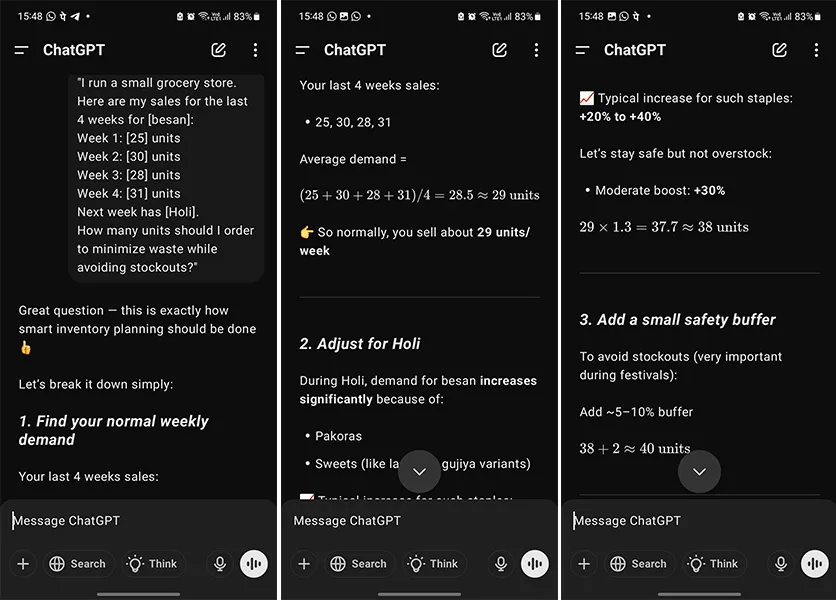
I felt slightly ridiculous typing my milk sales into a chatbot. Then it predicted a slow week perfectly, and I stopped feeling ridiculous. By week 4, I was at 85% order accuracy. It correctly predicted a 20% sales bump the week before a local festival.
Every Monday morning I paste this prompt with my last 4 weeks of sales data:
Week 1: X units
Week 2: X units
Week 3: X units
Week 4: X units
Next week has [any holiday or local event].
How many units should I order to minimize waste?
I don’t follow the answer blindly — it’s a starting point, not a command. The limitation: useless until you have 3–4 weeks of real data. Be patient with it in week 1.
📖 Full prompt library in my food waste reduction guide — 5 copy-paste ChatGPT prompts ready to use.
7. Google Trends — Best for Seasonal Planning
Google Trends
No account needed. Go to trends.google.com, search your top 5 products, set the time range to 12 months, and select your country. You’ll see the seasonal demand pattern for each product — when it peaks, when it dips, and what’s trending in your area.
I use it to prep for Diwali, Holi, summer heat waves, and school season. For US/UK stores — Christmas, Thanksgiving, summer BBQ season. The patterns repeat every year and Google Trends shows them for free.
8. Meta Business Suite Insights — Best for Local Demand Signals
Meta Business Suite
If you have a Facebook or Instagram page for your store — and you should, it’s free — Meta Business Suite shows you when your local customers are most active. I discovered my customers were most active at 8 AM and 7 PM. I adjusted my WhatsApp discount broadcasts to those exact times and got 40% more responses.
That’s AI-powered local market intelligence at zero cost. No survey, no guesswork — just the data showing you exactly when to reach your customers.
🗑️ Category 3: Expiry Tracking & Waste Reduction (2 Free Tools)
Food waste is the silent profit killer in small grocery and convenience stores. These two tools work together to stop it.
9. My Free AI Waste Tracker (Excel/Google Sheets)
AI Waste Tracker
I built this for my own store after failing to find a free waste tracking tool that actually worked. It has 7 sheets: Daily Waste Log, Expiry Alert Tracker (with 🔴🟠🟡🟢 color coding), Weekly Sales Tracker, Monthly Savings Dashboard, 5-year profit projection, ChatGPT prompts, and a staff daily checklist.
Works in Excel, Google Sheets, and LibreOffice. Enter your products once — the file does the rest. The Savings Dashboard shows you exactly how much you’ve recovered month by month.
📥 Download the free Waste Tracker here — no credit card, instant access after email confirmation.
10. WhatsApp Business — Best Free Near-Expiry Discount System
WhatsApp Business
This isn’t an AI tool in the traditional sense — but combined with Canva graphics and Zoho expiry alerts it creates a near-zero-waste discount system. When Zoho alerts me that paneer is 3 days from expiry, I photograph it, make a quick Canva graphic with the 30% discount, and broadcast it to my regular customers.
Result: I now sell 78% of near-expiry stock instead of throwing it away. That’s the single biggest waste reduction improvement in my store.
US/UK/AU alternative: Use Brevo free tier (Tool 13) — 9,000 emails/month, unlimited contacts, free forever. Same idea, email instead of WhatsApp.
🎯 Category 4: Marketing & Content (3 Free Tools)
You don’t need a marketing budget. You need these three free tools and 30 minutes a week.
11. Canva Free — Best for Discount Signs & Social Media
Canva
Before Canva, I wrote discount signs by hand on cardboard. Now I spend 5 minutes making a professional sign with the product photo, price, and discount percentage — and customers actually stop and look. The discount shelf went from ignored to something customers ask for by name.
The Magic Design AI feature generates complete designs from a text prompt. Type “30% off near-expiry dairy products grocery store sign” and it gives you 8 options instantly.
Time-saving tip: Save your discount sign as a template. Each week, just change the product name and price — takes 2 minutes instead of 5.
12. CapCut Free — Best for Store Video Content
CapCut
Short video content is the most effective free marketing for local retail stores in 2026. A 30-second video of your fresh produce arriving in the morning, posted to Instagram or WhatsApp, brings more walk-in customers than most paid ads for small stores.
CapCut’s AI auto-caption feature adds text automatically — customers watch videos on mute. The free plan has no watermark (create a free account to remove it) and 10GB cloud storage is plenty for a retail store’s video needs.
13. Brevo Free — Best for Customer Email Marketing
Brevo (formerly Sendinblue)
Brevo’s free plan gives you unlimited contacts and 9,000 emails per month — enough for most small retail stores to send weekly newsletters, discount alerts, and new arrival announcements. The AI subject line generator writes email subjects that actually get opened.
Why Brevo over Mailchimp: Mailchimp’s free plan now caps at 500 contacts with key automation features removed. Brevo gives you unlimited contacts and 9,000 emails/month. No contest for a retail store building a customer list.
⚙️ Category 5: Operations & Admin (2 Free Tools)
Two tools that handle the back-office work most small store owners still do manually in 2026.
14. Wave Accounting — Best Free Accounting for Small Retail
Wave Accounting
Wave gives you completely free invoicing, accounting, and AI receipt scanning. Photograph your supplier invoice with your phone — Wave’s AI reads the amount, date, and vendor automatically and logs it. No manual data entry for purchase records.
At the end of the month, your profit/loss is already calculated. For a store owner doing bookkeeping manually — this saves 2–3 hours every month at zero cost.
15. Google Business Profile — Highest ROI Tool on This List
Google Business Profile
I gave this a 5/5 because it’s the only tool on this list that brings new customers to your door — all the others help you serve customers better once they’re there. Google Business Profile gets you into the “grocery store near me” results for free.
The AI features: auto-suggested responses to customer reviews, Q&A answers that appear in search results, and AI-powered post suggestions for your promotions. I post one promotion every week — takes 3 minutes — and it shows up when people search for stores in my area.
Google Business Profile deserves its own guide — I wrote a complete GBP setup walkthrough for small retail that covers everything from verification to the 4-week ranking playbook.
If you only set up one tool from this entire list — make it this one.
🏆 My Personal Top 5 — If I Could Only Keep 5 Tools
| Rank | Tool | Why It’s My Favorite | Time Saved/Week |
|---|---|---|---|
| 🥇 #1 | Zoho Inventory | Caught 23 near-expiry items in week 1. Saved $180/month. I compared 7 inventory tools head-to-head— full 7-tool comparison | 8 hours |
| 🥈 #2 | ChatGPT | 85% order accuracy after 4 weeks. 5 minutes every Monday. | 3 hours |
| 🥉 #3 | Google Business Profile | Brings new customers. Zero ad spend. Highest ROI on the list. | New revenue |
| 4️⃣ #4 | Google Lens | Zero missed expiry dates since week 2. Already on your phone. | 2 hours |
| 5️⃣ #5 | Canva | Professional discount signs in 5 minutes. Customers ask for the deal shelf by name. | 1 hour |
📋 All 15 Free AI Tools small retail — Quick Reference
| # | Tool | Category | Best For | Forever Free |
|---|---|---|---|---|
| 1 | Zoho Inventory | Inventory | Perishables, expiry tracking, reorder points | ✅ |
| 2 | Python Alert System | Inventory | Automated expiry emails (Zoho free users) | ✅ |
| 3 | Google Sheets | Inventory | Custom tracking, unlimited flexibility | ✅ |
| 4 | Google Lens | Inventory | Expiry date + barcode scanning | ✅ |
| 5 | Square for Retail | Inventory + POS | Non-perishable retail, fast setup | ✅ |
| 6 | ChatGPT | Forecasting | Weekly order predictions | ✅ |
| 7 | Google Trends | Forecasting | Seasonal demand planning | ✅ |
| 8 | Meta Business Suite | Forecasting | Local customer demand signals | ✅ |
| 9 | AI Waste Tracker | Waste Reduction | Logging, tracking, 5-year savings | ✅ |
| 10 | WhatsApp Business | Waste Reduction | Near-expiry discount broadcasts | ✅ |
| 11 | Canva | Marketing | Discount signs, social media | ✅ |
| 12 | CapCut | Marketing | Store video content | ✅ |
| 13 | Brevo | Marketing | Customer email list (9K/month free) | ✅ |
| 14 | Wave Accounting | Operations | Invoicing, receipt scanning | ✅ |
| 15 | Google Business Profile | Operations | Local search, reviews, new customers | ✅ |
⚠️ The Free Tier Trap — When Free Tools Actually Cost You
Not all free tiers are created equal. Some are genuinely useful forever. Others give you just enough to get dependent — then hit you with a steep price increase.
⚠️ My rule: Don’t pay for a tool until the free version has already saved you enough money to cover the paid plan. If Zoho free saves you $63/month in waste, the $39/month Standard plan pays for itself with $24 to spare. Do that math before upgrading anything.
| Scenario | Stay Free | Consider Upgrading |
|---|---|---|
| Under 100 SKUs, non-perishables | ✅ All 15 tools free is enough | ❌ Not needed |
| 100–500 SKUs with perishables | ✅ Zoho free + Python workaround | ⚠️ If you need 2+ users |
| 500+ SKUs, multiple staff | ⚠️ Free plan limits may pinch | ✅ Zoho Standard $39/mo |
| Need automated batch tracking | ❌ Python workaround is closest | ✅ Zoho Standard or above |
| Email list sending over 9,000/month | ❌ Brevo free limit hit | ✅ Brevo Starter $25/mo |
❌ Tools That Didn’t Make the List — And Why
I tested 20+ tools. Six didn’t make the cut. Here’s the honest reason — because you might encounter them and waste time the way I did.
Note on Sortly: Sortly does offer a forever-free plan (100 items, 1 user) — but with no expiry tracking, no low stock alerts, and no purchase orders on the free tier, it’s too limited for most grocery stores. It’s a strong option for non-perishable retail. See my full Zoho vs Sortly comparison to decide which fits your store.
🚫 Common Mistakes Small Retailers Make with Free AI Tools
Mistake 1: Installing all 15 at once. You’ll use none of them properly. Start with 3. Master them. Then add more. I learned this the hard way in week 1.
Mistake 2: Not measuring results. If you don’t track waste saved and time saved — you don’t know if the tool is working. Use the Waste Tracker from Tool 9 from day one.
Mistake 3: Giving staff full admin access. Vishal accidentally deleted a product in Zoho. Now he has limited access. Start with read-only or limited permissions for every new tool.
Mistake 4: Ignoring free tier limits until you hit them. Know your limits before you start. I’ve listed all limits in every tool card above. Plan your upgrade before you’re locked out mid-month.
Mistake 5: Over-automation. AI doesn’t replace your judgment. ChatGPT’s order forecast is a starting point — not a command. You still know your local market, your customers, your suppliers better than any algorithm.
📅 4-Week Implementation Plan — The Order That Works
Don’t implement all 15 tools at once. Each week builds on the last. Week 1 is the most important — get it right and everything else follows.
After setting up these tools, here’s how I reduced stockouts by 73% →
| Week | Focus | Tools to Set Up | Time Required |
|---|---|---|---|
| Week 1 | Foundation | Zoho Inventory + Google Sheets + Google Lens | One Saturday afternoon |
| Week 2 | Intelligence | ChatGPT + Waste Tracker + Python alerts | 1–2 hours, then 10 min/day |
| Week 3 | Marketing | Canva + WhatsApp Business + Google Business Profile | 2 hours total |
| Week 4 | Growth | Brevo + CapCut + Wave + Meta Insights | 2 hours total |
Week 1 is non-negotiable. Get Zoho + Google Sheets + Google Lens working as a system and you’ll see results within 7 days. The other 12 tools build on that foundation.
📥 Free Download: AI Tools Cheat Sheet + Prompt Library
Everything from this article in one place — all 15 tools, free tier limits, the 4-week plan, and 30+ copy-paste ChatGPT prompts for retail ordering.
What’s included:
- 📋 All 15 tools with free tier limits (printable reference card)
- 🤖 30+ ChatGPT prompts for retail — copy-paste ready
- 📊 Waste Tracker Excel file (189 formulas, pre-built)
- 🐍 Python Expiry Alert System (Windows + Mac files)
- ✅ 4-week implementation checklist
- 📱 Staff morning routine guide (print and laminate)
Enter your email to get instant access:
👉
Submit and Get Instant Access To Our Full Download Repository Right Away.
Free. No credit card. Instant access after email confirmation.
FAQs — Free AI Tools Small Retail
Are these tools really free or just free trials?
All 15 tools on this list have a genuine forever-free tier — not a time-limited trial. Zoho Inventory, Google Sheets, Google Lens, ChatGPT, Canva, Brevo, Wave, and Google Business Profile are all free with no expiry date on the free plan. I’ve confirmed free tier limits for each tool in March 2026.
Which single tool will make the biggest difference immediately?
Zoho Inventory free tier — if you sell perishables. It caught 23 near-expiry items in my first week and saved $180/month in food waste. Start here this weekend. If you don’t sell perishables, start with Google Business Profile — it brings new customers through your door at zero cost and zero ad spend.
Do these tools work for stores outside India — US, UK, Australia?
Yes. All 15 tools work globally. Wave Accounting is actually stronger in US/UK/AU than in India. Brevo and Google Business Profile work everywhere. Zoho Inventory supports all currencies and has US, EU, and India data centers. I’ve noted where specific tools have regional limitations in each tool card above.
How much time does it take to set up all 15 tools?
Don’t set up all 15 at once — that’s Mistake 1 from the mistakes section. Follow the 4-week plan: Week 1 takes one Saturday afternoon. Each subsequent week takes 1–2 hours. By week 4 you have all 15 running with 15–20 minutes of daily maintenance.
Can a non-technical store owner use these?
Yes. If you can use WhatsApp and basic Excel, you can use 13 of the 15 tools without any help. The only exceptions are the Python Expiry Alert System (requires Python installation — full guide provided in the download) and Google Sheets formulas (ChatGPT writes them for you in 5 minutes). Vishal learned all the others without any training from me.
What happens when free plan limits run out?
You’ll get a notification from the tool before you hit the limit. Zoho alerts you when you approach 40 orders/month. My rule: don’t upgrade until the free version has already saved you enough money to cover the paid plan. If Zoho free saves you $63/month in waste, the $39/month Standard plan pays for itself with $24 left over. Do that math for every tool before upgrading.
Are there any hidden costs I should know about?
No hidden costs for the 15 tools listed. But watch for: Square charges transaction fees on every sale (2.6% + $0.15 in-person). WhatsApp Business is free but WhatsApp API for automation is paid. Canva’s background remover is capped at 5 uses per month on the free plan. CapCut’s no-watermark feature requires creating a free account. I’ve listed all limits in every tool card above.
Which tools work best together as a complete free system?
My core free stack: Zoho Inventory + ChatGPT + Google Sheets + Canva + Google Business Profile. These 5 cover inventory, ordering, tracking, marketing, and local search — the 5 biggest areas of running a small retail store. Add the Python alert system and Waste Tracker for a complete $0 retail operating system that took me 60 days to build and test.
✅ Your Move — Start With These 3 Tools This Weekend
Don’t install all 15 this weekend. Pick the one tool that solves your biggest headache right now and start there.
If I had to start again from zero, knowing what I know now, I’d do this in this exact order:
- Zoho Inventory free tier — set up this Saturday. One afternoon. Stops the waste bleeding immediately. Full setup guide here.
- Google Business Profile — claim and complete your profile this Sunday. 20 minutes. Starts bringing new customers within days.
- ChatGPT for Monday ordering — use it next Monday morning for your first order. 5 minutes. You’ll never go back to guessing.
These 3 tools combined, at $0 cost, will save you 4–6 hours per week and stop the single biggest profit leak in your store. Everything else on this list is an upgrade, not a requirement.
If you’re not sure where to start with inventory tools, read my full comparison: 7 Best AI Inventory Tools for Small Retail — 60 days of real testing, honest results.
Already using Zoho? Get the full setup guide with the free Python alert files: Zoho Inventory Setup Guide for Small Retail.
Comparing Zoho against Sortly? Zoho vs Sortly for Small Retail — Which Is Better?

About the Author
Rahul Saini
Grocery store owner in Hisar, India, running gharstuff.com since 2019 with 800–1,200 SKUs daily. I test AI tools in my real store — with real staff, real customers, and real consequences when something doesn’t work. Every number on this site is from my actual store.
Read My Full Story →Last updated: March 2026. All free tier limits verified. I will re-test and update this guide every 6 months as free plans change. Author: Rahul Saini, grocery store owner and founder of SmallRetailAI.com.
Which tool are you starting with? Let me know in the comments — I read every one.